Site.pro
  • AI Website Builder
    • AI Website Builder
    • Prices
    • Website Import
    • Online Stores
    • Plugins
    • Collaboration
    • Templates
    • Languages
    • Affiliate Program
    • Examples
    • For Design Studios
    • Website Builder
    • For Domain Investors
    • We Build for You
  • Domains
  • Email
  • Learn
    • Tutorials
    • Blog
    • FAQ
    • Growth Hacking
    • For Hostings
    • Domainity
    • For Education
  • Accounting Software
    • Knowledge Base
    • Sole Proprietor
    • Accounting Software
    • Modules
    • Integrations, API
    • Prices
    • Business Types
    • Invoice Recognition
    • Training
    • Affiliate Partners
    • Accounting companies (363)
    • Software integrators (48)
    • Teaching Institutions (68)
    • Useful Links
  • For Resellers
    • Prices
    • White Label
    • Revenue Share
    • Panels
    • How it Works
    • Mass Import
    • Our Partners
    • Reselling Examples
    • Marketing Materials
    • Documentation
    • Free Websites
  • AI Website Builder
    • AI Website BuilderCreate your website easily and for free with AI. AI is creating website for you in seconds
    • PricesSite.pro Prices: Templates 200+, Websites, Basic Builder Functions, Online Stores.
    • Website ImportTransfer your existing website from anywhere to Site.pro website builder.
    • Online StoresSell your goods or services anywhere on the website.
    • PluginsMany functions and plugins depending on geographical preferences.
    • CollaborationCollaborative Website Builder, Create a website with teammates in real-time in one space.
    • Templates
    • Languages
    • Affiliate Program
    • Examples
    • For Design Studios
    • Website Builder
    • For Domain Investors
    • We Build for You
  • Domains
  • Email
  • Learn
    • TutorialsVideos for Beginners. Download video tutorials for free
    • BlogWebsite Builder Lifehacks: Shared Hosting tips from Hosting Market Leaders.
    • FAQUse this FAQ database to find information about working with Site.pro products quickly and easily.
    • Growth HackingBoost your sales. Strategy
    • For HostingsEducation. Generate more website builder sales.
    • DomainityDomainity: Domain quantity per 1000 people
    • For EducationFree Website Builder for Online and Offline Classrooms.
  • Accounting Software
    • Sole ProprietorAutomated invoicing, accounting of expenses and income, e-shop integrations.
    • Accounting SoftwareAccounting software designed for small and medium-sized companies
    • ModulesModules required for accounting of production, trade, service provision and other companies.
    • Integrations, APIPlugins for e-shops, synchronisation with trading portals, Integrations With Cash Registers and POS Systems, Other Integrations.
    • PricesSite.pro accounting software 30 days for free. Comparison of plans, import from other programs.
    • Knowledge Base
    • Business Types
    • Invoice Recognition
    • Training
    • Affiliate Partners
    • Accounting companies (363)
    • Software integrators (48)
    • Teaching Institutions (68)
    • Useful Links
  • For ResellersWhite Label
    • PricesStart reselling. Pay for live websites. Free Websites.
    • White LabelThe most popular white label tool is ideal for reselling
    • Revenue ShareWebsite Builder: Provide free website builder and earn 50% commissions.
    • PanelsOne product for all platforms. Download plugin for your panel.
    • How it WorksCloud or On-Premises. Recommendations for Builder Server.
    • Marketing MaterialsVideo. Mockups. Website Blocks. Marketing Materials.
    • Mass Import
    • Our Partners
    • Reselling Examples
    • Documentation
    • Free Websites
  • Register
    By registering, you accept our Terms of Service
  • Log in

    Log in

    New user? Create account
    Forgot password?
  • $
  • English
  • Dashboard (company) (17)
  • Warehouse (109)
    • Sales (42)
    • Simplified invoicing (5)
    • Client prices (1)
    • Automatic invoicing (1)
    • Purchases (26)
    • Sales return (6)
    • Item stock (1)
    • Item movement (1)
    • Consignment balance (1)
    • Inventory (1)
    • Revalue (1)
    • Internal movement confirmation (1)
    • E-commerce (17)
    • Cash register sales (5)
  • General ledger (32)
    • General register (16)
    • Doc. settlement (2)
    • Period closure (1)
    • Currency exchange rate range (3)
    • Financial accountability articles (2)
      • Financial accountability articles (1)
    • Cost centers (3)
      • Cost centers (2)
      • Cost centers groups (1)
    • Chart of accounts (5)
  • Bank (30)
    • Bank (11)
    • Bank link with cor. account (2)
    • Import statements (13)
    • SEPA payments (4)
  • Cashier (3)
    • Cashier (1)
    • Money receiving receipts (1)
    • Registers (1)
      • Responsible persons (1)
  • Reports (33)
    • Inventory report (8)
    • General ledger reports (9)
    • Ind. activity report (1)
    • Sales-purchases (4)
    • Debt management (4)
    • Balances / PLN (2)
    • Other reports (3)
  • Personnel (22)
    • Employees (14)
    • Requests (1)
    • CV (1)
    • Registers (6)
      • Job positions (1)
      • Tax exempt income (2)
      • Request types (2)
  • Reference book (26)
    • Item cards (5)
    • Warehouse (10)
      • Warehouses (2)
      • Operation types (5)
    • Intrastat (6)
    • Locations (1)
    • Banks (1)
    • Currencies (2)
    • Currency exchange rates (1)
  • Production (5)
    • Technological cards (1)
    • Production from technological cards (2)
    • Bundle / debundle (2)
  • Assets (15)
    • Long-term assets (13)
      • Long-term assets (13)
    • Low value assets (1)
    • General report (1)
  • Documents (32)
    • Orders (15)
      • Orders (8)
      • Order attributes (5)
      • Daily allowance (2)
    • Insurance (1)
      • Insurance register (1)
    • Agreements (1)
      • Agreements (1)
    • Emails registry (2)
    • Outgoing mail register (1)
    • Incoming / Outgoing document register (1)
    • Annual leave (7)
      • Accumulated holiday days (2)
      • Vacation balances (3)
    • Incapacity certificate (2)
    • Internal documents (2)
  • Salary (48)
    • Payroll (25)
    • Timesheets (6)
    • Work schedule (1)
    • Wage prints (11)
    • Registers (5)
      • Wage codes (Registers) (2)
  • Declaration (41)
    • Generate declarations (15)
    • Declaration attributes (1)
    • i.VAZ (14)
      • Clients (11)
    • i.SAF (4)
    • SAF-T (1)
    • GPAIS (6)
  • Settings (198)
    • Settings (33)
      • System and logos (6)
      • Sales (4)
      • Accounting (6)
      • Declarations (1)
      • Data exchange (2)
      • Users / employees (1)
      • Recognition of accounts (1)
      • Additional employee attributes (1)
      • Additional item attributes (1)
      • Additional sale attributes (1)
      • Approval of documents (1)
      • Self-employed (1)
      • Sending invoices by email (1)
    • Integrations (156)
      • API (22)
        • API (13)
        • API #2 (5)
      • Plugins for E-shops (20)
        • WooCommerce (5)
        • PrestaShop (5)
        • Opencart (5)
        • Adobe Commerce (Magento) (5)
      • Trading Portals (55)
        • eBay (8)
        • Amazon (9)
        • Shopify (12)
        • Etsy (9)
        • Site.pro (6)
        • Varle.lt (2)
        • Verskis (5)
        • Pigu.lt (4)
      • Cash registers (21)
        • Paysera POS (1)
        • Čekis cash register (1)
        • Raso cash registers (12)
        • Cash registers (5)
        • R-Keeper (1)
        • nSoft (1)
      • Paysera (2)
      • Automatic import of bank statements (via Neopay) (5)
      • Data exchange with Creditonline.eu (2)
      • MIP (5)
    • Data import (9)
  • Account (113)
    • Dashboard (21)
    • Companies and users (28)
    • File upload (8)
    • Employee account (5)
    • My data (19)
    • Affiliate program (4)
    • Invites (2)
    • Reminders (2)
    • Support (7)
      • How to book the program training? (1)
    • Statistics (4)
    • Other information (13)
  • Encyclopedia (15)
Category
Search

How to register fixed assets?
FAQ
›
Long-term assets
How to register fixed assets?

How to register fixed assets?

Long-term assets can be put into use only as an item from the warehouse, i.e., a long-term asset purchase document must be entered first. Only then can the item be put into use as a long-term asset.

Create a transaction type for entering the long-term asset
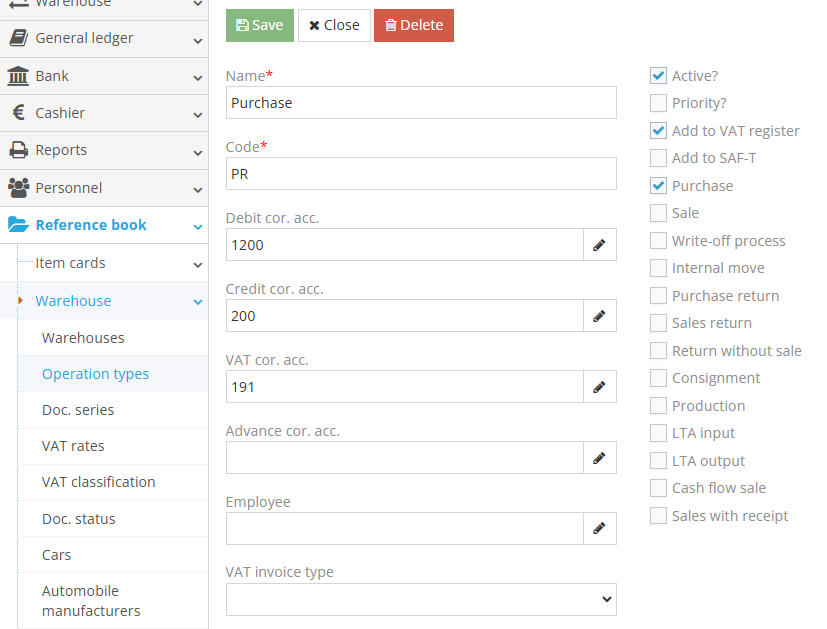
Reference book → Warehouse → Operation type Types
In the module, click the green "+" button to create a new entry. Create a "Purchase" transaction with the necessary settings and corresponding accounts. After filling in the fields, click the "Save" button. If such a transaction already exists, there is no need to create a new one.
2. Create an item card
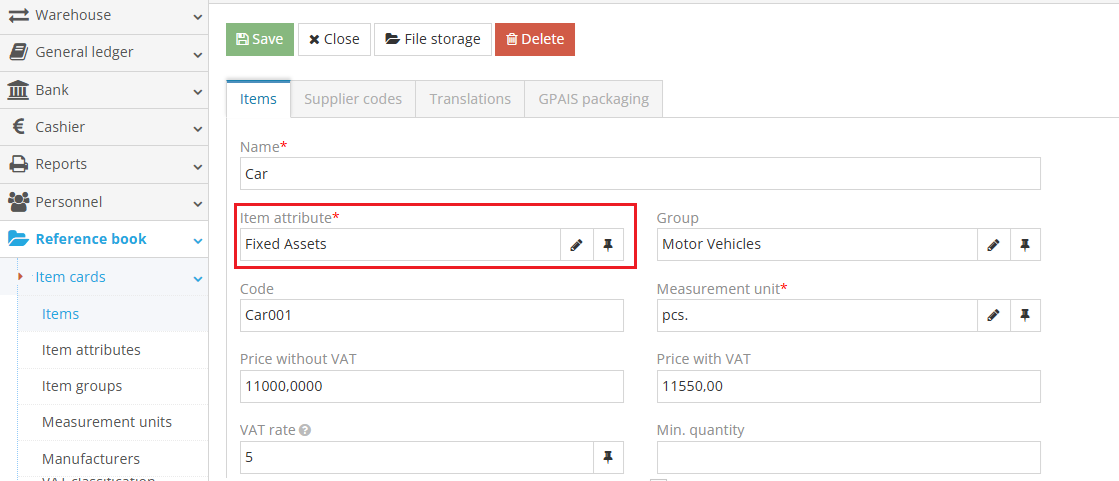
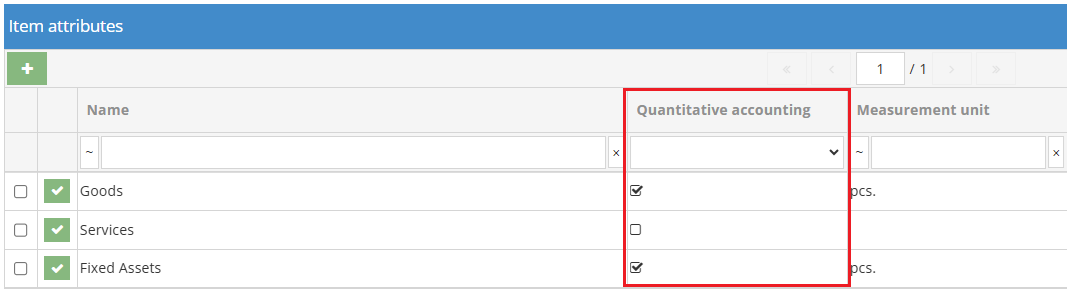
Create a card, for example: “Car,” and select the item type with quantity tracking enabled.
Item attribute
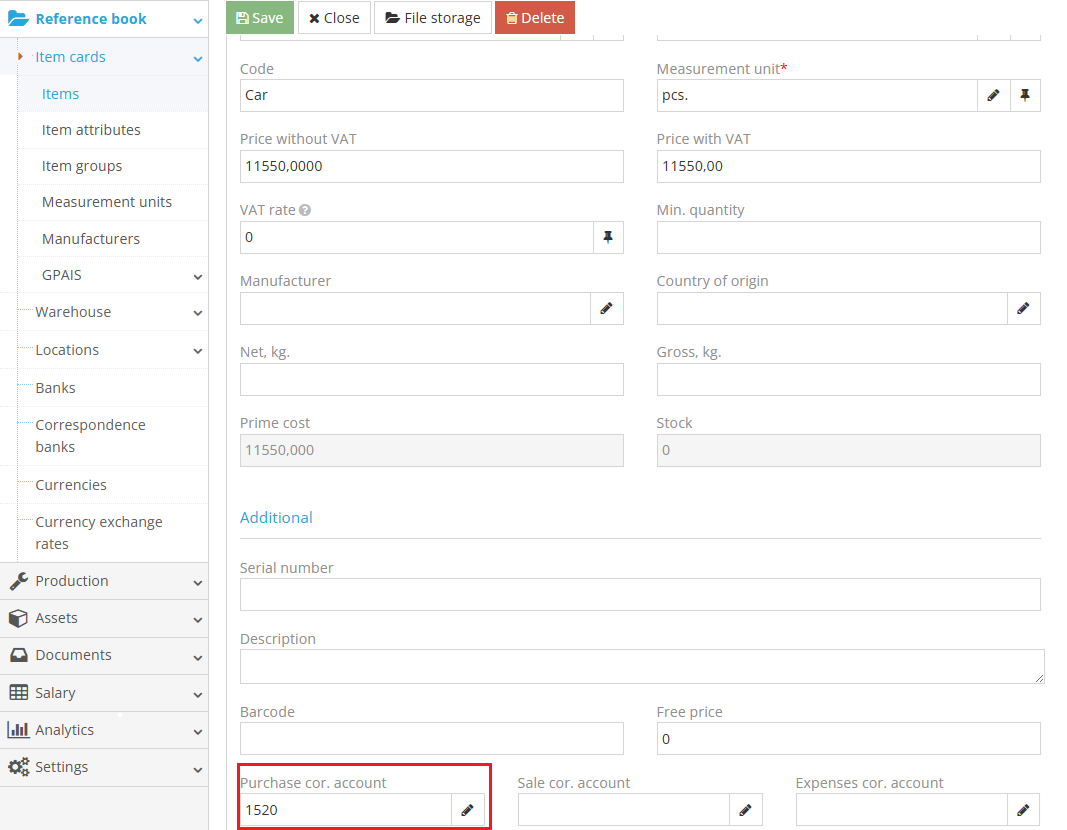
3. In the field “Purchase cor.t account,” enter the intermediate offset account used for acquiring long-term assets. When recording the purchase, the program will take the debit offset account from the item card. After completing these settings, click “Save.”
4. Register the purchase of the long-term asset
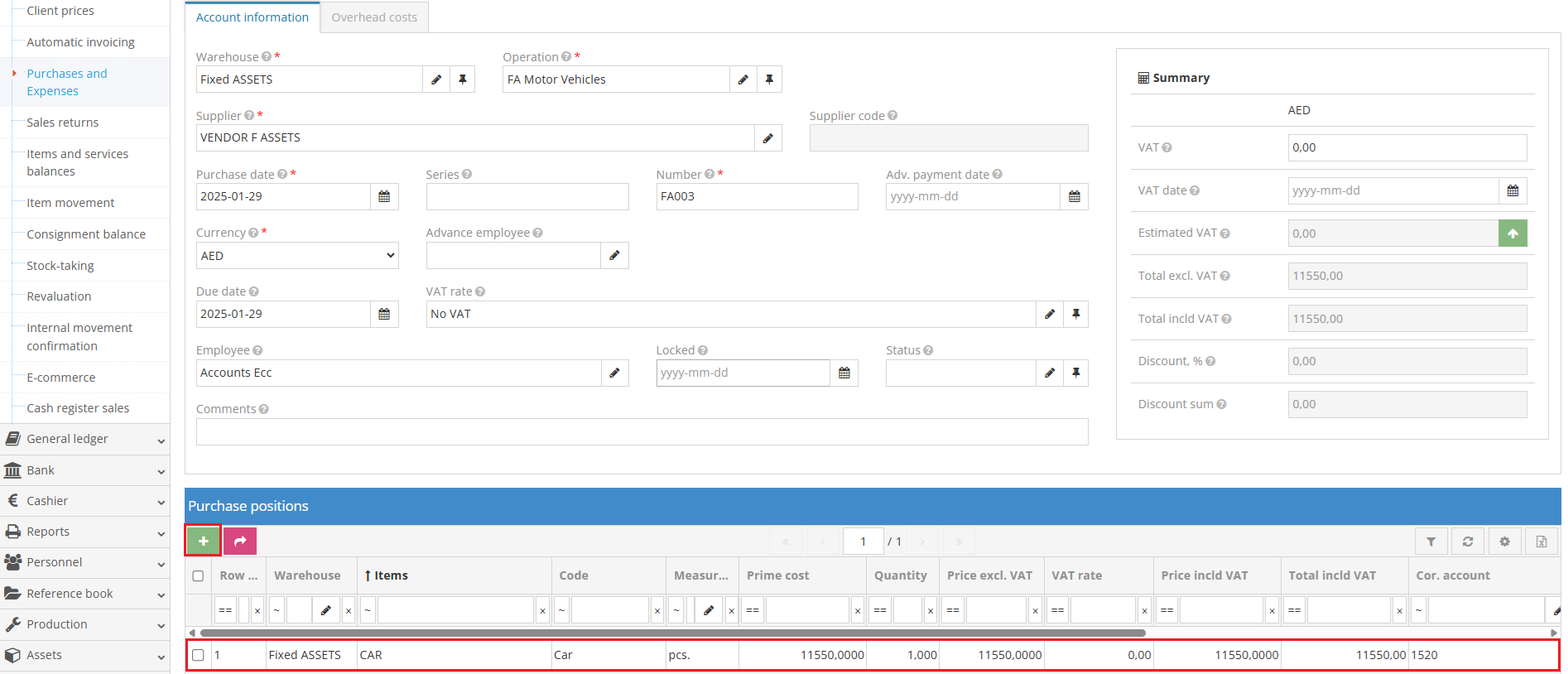
Warehouse → Purchases and Expenses
In the module, create a new entry by clicking the “Add new entry” button. When registering the entry, select the warehouse and the “Purchase” transaction type, and choose a supplier or create a new one.
In the “Purchase item” table, in the “Item” field, select the created item, i.e., the car, and specify the purchase amount, which is the price paid for the long-term asset. After entering the data, press the “Enter” key to confirm the entry. After registering the document, click the “Save” button.
5.Create long-term asset groups
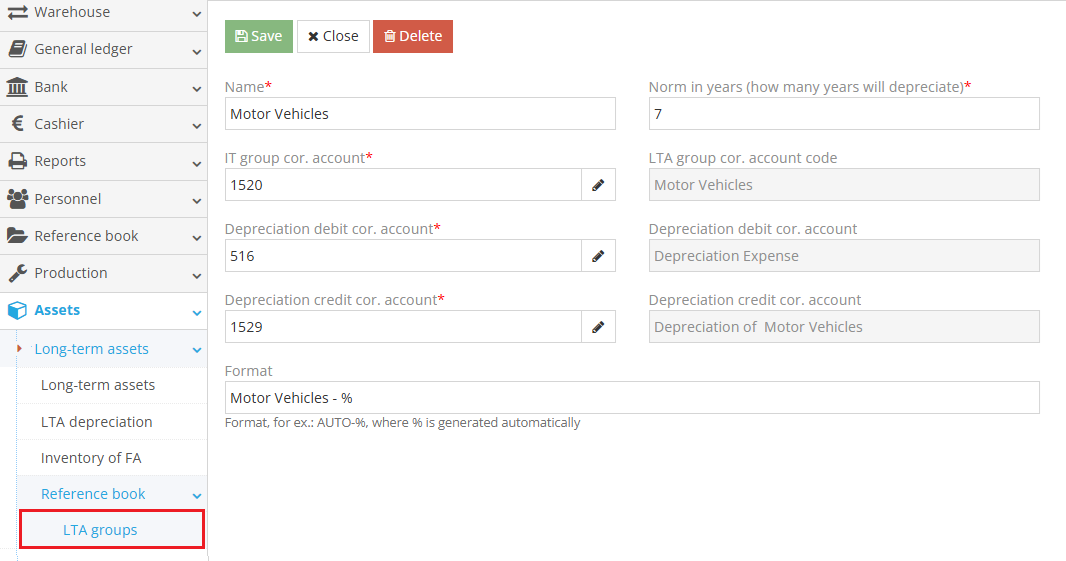
Assets → Long-term Assets → Reference book → IT Groups
The groups will be used as a reference book. Once created, you will be able to put the item into use, calculate depreciation, and perform inventory.
6.Entering a long-term asset

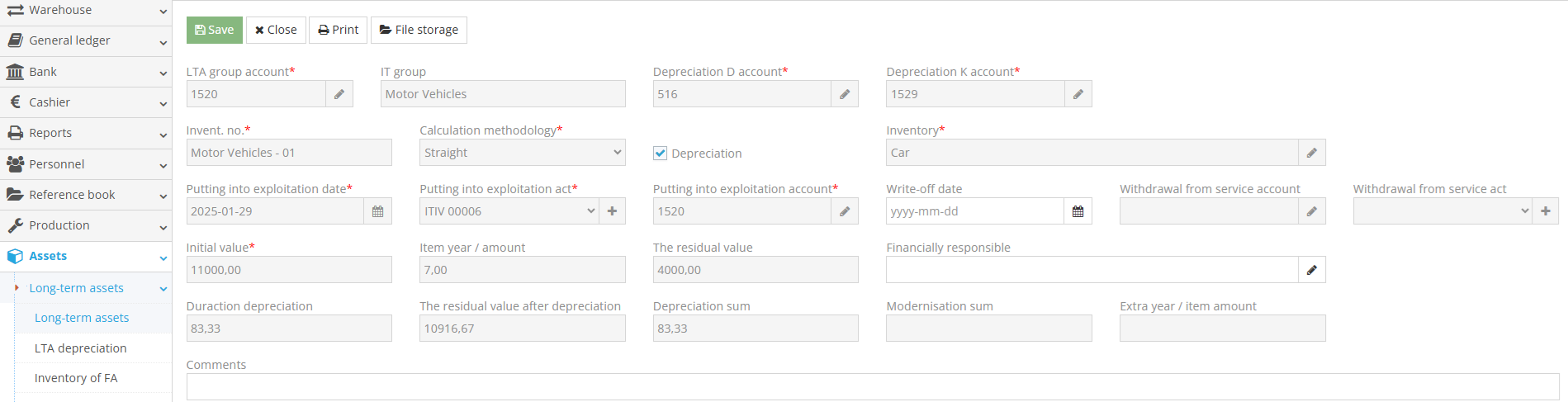
Assets → Long-term Assets → Long-term Assets

Click the “Add new entry” button and enter the long-term asset details. In the opened table, fill in the following fields:

  • LTA Group – when selected, the offset accounts will be filled in automatically;
  • Inventory Number;
  • Select the depreciation calculation method. Four options are available: Straight-line, Double declining balance, Units of production, Sum-of-the-years-digits;
  • If the asset is depreciable, check the box;
  • Inventory – select the long-term asset from stock balances;
  • Specify the "Putting into exploitation date" (Note: this date cannot be earlier than the acquisition date);
  • Putting into exploitation act– click the “+” button to create the act, i.e., transfer the item from the warehouse to long-term assets;
  • Indicate the initial value.

After filling in the fields, click the “Save” button. The long-term asset is now registered.


People also found this article using these queries:

  • how to register fixed assets
© Site.pro 2011. Website Builder. United States.
Contact SalesTerms of ServicePrivacy Policy