Site.pro
  • 人工智能網站建立器
    • 人工智能網站建立器
    • 價格
    • 網上商店
    • 合作
    • 網站導入
    • 插件
    • 網站建立者
    • 範本
    • 對於設計工作室
    • 語言
    • 聯盟計劃
    • 示例
    • 適合網域投資者
    • 我們為您打造
  • 網域
  • 電子郵件
  • 會計軟件
    • 會計軟件
    • 模組
    • 價格
    • 整合, API
    • 會計公司 (366)
    • 軟件整合商 (48)
    • 合作夥伴
    • 有用的連結
    • 業務類型
    • 會計公司
    • 個體經營者
    • 開立發票
    • Farmer
    • 電子商務
  • 針對經銷商
    • 價格
    • 白色標籤
    • 收入份額
    • 面板
    • 如何參與
    • 行銷資料
    • 批量導入
    • 我們的合作夥伴
    • 再售例子
    • 文檔
    • 免費網站
  • 學
    • 知識庫
    • 教程
    • 博客
    • 成長駭客
    • 對於託管
    • 領域性
    • 用於培訓
    • 會計: 工作開始
    • 教育機構 (68)
    • 全球會計課程
    • 阿聯酋會計在線課程
  • 人工智能網站建立器
    • 人工智能網站建立器AI 為你創建網站
    • 價格進階功能
    • 網上商店建立網上商店
    • 合作即時協作
    • 網站導入匯入任何網站
    • 插件構建器插件和功能
    • 網站建立者主要特徵
    • 範本200+ 精彩範本
    • 對於設計工作室設計工作室的益處
    • 語言
    • 聯盟計劃
    • 示例
    • 適合網域投資者
    • 我們為您打造
  • 網域
  • 電子郵件
  • 會計軟件
    • 會計軟件基於雲端的ERP
    • 模組主要會計軟件模組
    • 價格免費試用 30 天
    • 整合, API與外部系統整合
    • 會計公司 (366)選擇您的會計合作夥伴
    • 軟件整合商 (48)選擇您的整合合作夥伴
    • 合作夥伴合作夥伴與聯盟計劃
    • 有用的連結Calculators and Calendars
    • 業務類型使用案例
    • 會計公司
    • 個體經營者
    • 開立發票
    • Farmer
    • 電子商務
  • 針對經銷商白色標籤
    • 價格收入份額. 白色標籤
    • 白色標籤客製化生成器
    • 收入份額從每次升級中賺取 50%
    • 面板全平台通用產品
    • 如何參與雲端或本地
    • 行銷資料視頻. 模型. 塊
    • 批量導入
    • 我們的合作夥伴
    • 再售例子
    • 文檔
    • 免費網站
  • 學
    • 知識庫常見問題: 網站建置者, 會計
    • 教程免費下載
    • 博客Site.pro 博客
    • 成長駭客促進您的銷售
    • 對於託管營銷技巧。
    • 領域性按國家/地區劃分的域名使用情況
    • 用於培訓訓練. 教程
    • 會計: 工作開始
    • 教育機構 (68)
    • 全球會計課程
    • 阿聯酋會計在線課程
  • 申請
    註冊即表示您接受我們的服務條款
  • 登入

    登入

    新用戶? 創建帳號
    忘記密碼?
  • $
  • 繁體

In-house or Commercial: What Panel is the Best for Hosting Companies?

In-house or Commercial: What Panel is the Best for Hosting Companies?
博客: Shared Hosting

In September 2025, Site.pro’s team took part in the Domain Summit in London. During the event, we shared experiences with Frederick Schiwek of Hosting.de, who gave valuable insights regarding web hosting panel development.

CEOs of both hosting companies and website builders face a difficult decision: whether to develop their own hosting panel or resort to commercial panels. The choice of a management system has a drastic impact on the business’s growth and on customer satisfaction.

Popular commercial solutions include panels such as WHMCS, Blesta, Hostbill, and Upmind. But what is better for the business: using one of the options mentioned above, or creating a custom solution?

In-house Panel: Pros and Cons

Advantages

Developing a custom panel gives hosting companies full control over its functions. The panel can be optimised for specific business processes, with no limitations imposed by third-party developers. Complete control also leads to high security—since all the data is processed and stored in-house, the team can immediately take action in case of an emergency and neutralise any security vulnerability on the spot. It is also easier to follow specific data protection regulations when your company is responsible for the product.

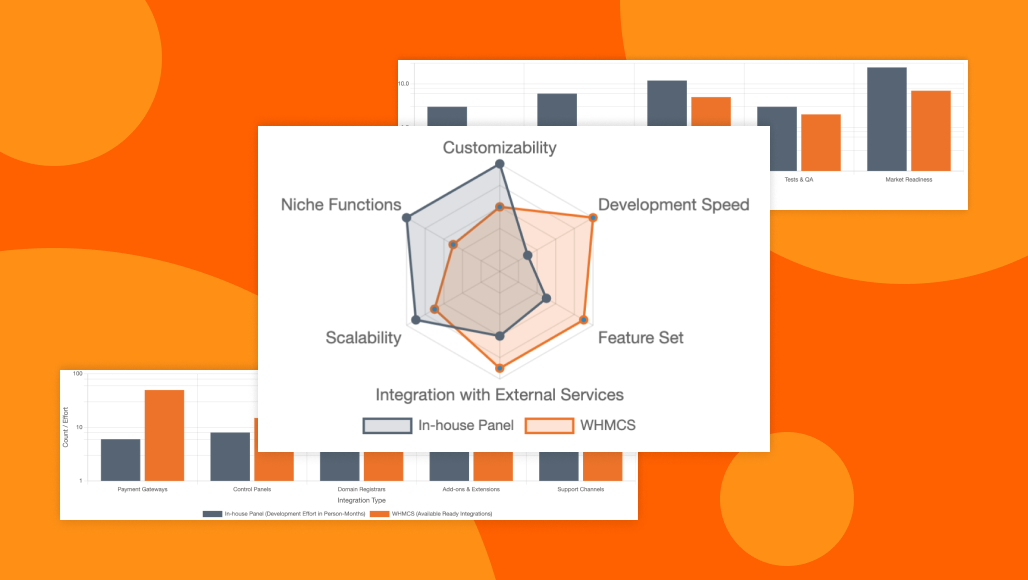
Flexibility and features comparison of two types of panelsFlexibility and features comparison of two types of panels

Moreover, developers can customise the panel however they want—setting up seamless connections to internal systems, including CRM, ERP, and customer support. The in-house panel also allows more room for future improvement.

As a product created by the hosting company itself, it does not come with any licence fees. Not only does this save money in the long term, it also allows the business to scale and grow more effectively, as in-house panels are not subject to licence restrictions. In this way, in-house panels become a competitive advantage for the business—a unique product optimised for the best customer experience.

Disadvantages

Still, in-house development has its own practical issues that need to be taken into consideration. The most obvious is the high cost that comes with developing a brand-new hosting panel. Creating a product from scratch requires significant investments in both time and resources. The process itself can take multiple years until the panel is finalised and ready for use. And even once it is finished, it requires proper maintenance and infrastructure. The responsibility for security, testing, and quality also lies on the shoulders of the development team.

Time comparison: in-house panels (months) vs. WHMCS (days)Time comparison: in-house panels (months) vs. WHMCS (days). Source: Frederick Schiwek's presentation for Domain Summit 2025

In-house vs Commercial Solution

Customisation Market entry Functionality Scalability Cost
In-house Unlimited Slow Need development High Unpredictable
Commercial Limited Fast Ready to use Low Predictable

Commercial SaaS panels are ready for installation and use upon purchase. The initial investment is low, and returns are quick. Costs are predictable from the start, with a monthly or annual licence fee based on the number of the company’s customers. This allows for fast market entry, as all core functions are available and configuration does not require programming.

Overall, domain and customer management are much easier on commercial panels, simply because these products have been in development for years. Much of their functionality has already been extensively tested, and their systems are mature and reliable. Commercial panels also often come with built-in billing from the start, whereas in-house development of such features is complex and expensive.

The Issue of In-house Development

The development of hosting panels in-house is complex, expensive, and carries significant risks. Aside from the panel itself, companies have to set up a support system, create and maintain documentation, and plan and test every feature of the product. When an important member of the team leaves, the product is affected. Meanwhile, commercial solutions have established communities, forums, and integrations with payment gateways, registrars, and more.

Ecosystem comparidson: development effort vs. available integrationsEcosystem comparidson: development effort vs. available integrations. Source: Frederick Schiwek's presentation for Domain Summit 2025

Should you Develop Your own Panel?

The short answer is yes—but there are nuances to consider. Your decision should be based first and foremost on the goals, budget, and resources of your company.

Key decision factors:

  • Company size and resources;
  • Specific requirements and niche market;
  • Growth plans;
  • Technical expertise of the team;
  • Development time.

Hosting.de Recommends

  • For startups — it is more reasonable to purchase a commercial solution for a quick launch, low risk, and cost-effectiveness.
  • For medium size or large companies — it makes sense to develop your own product when your requirements are specific and you are prepared to invest substantial resources into development. A hybrid approach also works—it is possible to buy a commercial panel as a base for future customisations.
  • Niche providers with special needs — if your goal is to provide customers with custom solutions and unique services, the in-house panel is the best option, as standard commercial panels cannot cover everything.

Final Thoughts

Choosing between an in-house panel and a commercial solution is ultimately a strategic decision that depends on a company’s size, resources, and long-term goals. Commercial panels offer speed, affordability, and reliability, while in-house solutions can prove to be a worthwhile investment with a competitive advantage over other options.

There is no one-size-fits-all answer—what matters most is aligning the choice of hosting panel with your business objectives, technical capabilities, and vision for the future.

上一個
How to Increase Traffic and Hosting Sales With AI Website Builder
下一個
Boost Your Sales: White Label vs Revenue Share
© Site.pro 2011. 網站建立者. 美国.
聯繫銷售人員服務條款私隱政策