Site.pro
  • AI Website Builder
    • AI Website Builder
    • Prices
    • Online Stores
    • Collaboration
    • Website Import
    • Plugins
    • Website Builder
    • Templates
    • For Design Studios
    • Languages
    • Affiliate Program
    • Examples
    • For Domain Investors
    • We Build for You
  • Domains
  • Email
  • Accounting Software
    • Accounting Software
    • Modules
    • Prices
    • Integrations, API
    • Accounting companies (366)
    • Software integrators (48)
    • Affiliate Partners
    • Useful Links
    • Business Types
    • Accounting companies
    • Sole Proprietor
    • Invoicing
    • Farmer
    • E-commerce
  • For Resellers
    • Prices
    • White Label
    • Revenue Share
    • Panels
    • How it Works
    • Marketing Materials
    • Mass Import
    • Our Partners
    • Reselling Examples
    • Documentation
    • Free Websites
  • Learn
    • Knowledge Base
    • Tutorials
    • Blog
    • Growth Hacking
    • For Hostings
    • Domainity
    • For Education
    • Accounting: Start of Work
    • Teaching Institutions (68)
    • Accounting Courses Worldwide
    • Online Course on UAE Accounting
  • AI Website Builder
    • AI Website BuilderAI creates websites for you
    • PricesAdvanced Features
    • Online StoresBuild online stores
    • CollaborationCo-create websites live
    • Website ImportImport Any Website
    • PluginsBuilder plugin and functions
    • Website BuilderKey Features
    • Templates200+ Awesome Templates
    • For Design StudiosBenefits for Design Studios
    • Languages
    • Affiliate Program
    • Examples
    • For Domain Investors
    • We Build for You
  • Domains
  • Email
  • Accounting Software
    • Accounting SoftwareCloud based ERP
    • ModulesMain accounting software modules
    • Prices30 days free trial
    • Integrations, APIIntegration with external systems
    • Accounting companies (366)Choose your partner for accounting
    • Software integrators (48)Pick your integrations partner
    • Affiliate PartnersPartners and Affiliate program
    • Useful LinksCalculators and Calendars
    • Business TypesUse cases
    • Accounting companies
    • Sole Proprietor
    • Invoicing
    • Farmer
    • E-commerce
  • For ResellersWhite Label
    • PricesRevenue Share. White Label
    • White LabelCustomise Builder
    • Revenue ShareEarn 50% from each upgrade
    • PanelsOne product for all platforms
    • How it WorksCloud or On-Premises
    • Marketing MaterialsVideo. Mockups. Blocks
    • Mass Import
    • Our Partners
    • Reselling Examples
    • Documentation
    • Free Websites
  • Learn
    • Knowledge BaseFAQ: Builder, Accounting
    • TutorialsDownload for free
    • BlogSite.pro Blog
    • Growth HackingBoost your sales
    • For HostingsTips on marketing
    • DomainityDomain usage by country
    • For EducationTraining. Tutorials
    • Accounting: Start of Work
    • Teaching Institutions (68)
    • Accounting Courses Worldwide
    • Online Course on UAE Accounting
  • Register
    By registering, you accept our Terms of Service
  • Log in

    Log in

    New user? Create account
    Forgot password?
  • $
  • English

How To Choose The Best Website Builder: Step By Step Guide

How To Choose The Best Website Builder: Step-By-Step Guide
Blog: eCommerce Web Design

As you go through these steps, pay close attention to the step of testing the builder during its free trial. This hands-on step lets you evaluate its ease of use, loading speed, and customisation capabilities.

Step 1: Identify Your Business Goals

Think about the type of website you need. If you are launching an online store, your focus should be on features like secure payment gateways, inventory management to keep track of your stock, and product pages that showcase your items with high-quality images and descriptions.

Platforms like Shopify and BigCommerce excel in providing these tools, making it easy to manage orders and streamline the shopping experience.

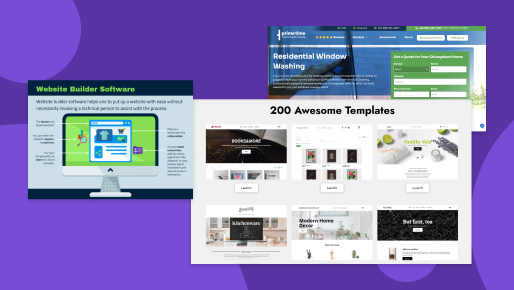
Website Builder SoftwareImage source: predictiveanalyticstoday.com

If you are building a service-based website like Prime Time Window Cleaning, your focus should be on features like appointment scheduling to let customers book services easily, custom quote forms to collect inquiries, and detailed service pages to outline your offers.

Platforms like Site.pro, Squarespace, and Wix are excellent for showcasing services with sleek designs and built-in booking systems. Similarly, if you are a blogger, WordPress is a great choice. It offers flexible themes and plugins to customise your website and tools like Yoast SEO to optimise your posts for better search engine visibility.

Example of showcasing servicesImage source: primetimewindowcleaning.com

Write down the key features your business requires like appointment scheduling, service pages, or multimedia galleries, to make sure your website meets your specific needs.

Step 2: Evaluate Your Technical Skills

Ask yourself, "Do I need something beginner-friendly?" If yes, try Site.pro, which offers drag-and-drop simplicity. If you are tech-savvy and comfortable with coding, WordPress.org gives you greater customisation options. To test, start with a free trial or demo to see if you feel confident navigating the interface.

If your website has complex requirements like building custom plugins or creating advanced database integrations, hire a professional developer to integrate these features seamlessly.

Step 3: Research Available Features

Create a checklist of must-have features for your own website to make sure the builder aligns with your goals. For example:

  • SEO tools
  • Analytics integration
  • Mobile responsiveness
  • Social media integration
  • eCommerce functionality
  • Third-party app integrations

Step 4: Check For Design Flexibility

Look for a platform that offers templates matching your industry. It should have templates for restaurants, fitness studios, and portfolios. Also, check if the templates are customisable, and test if they adapt automatically to mobile devices.

A good website builder should let you tweak fonts, colours, and layouts to match your brand identity. For example, Site.pro gives you access to 200+ high-quality templates designed for different industries. Pick a template that fits your business and use the drag-and-drop editor to adjust layouts, add images, or tweak colours.

Awesome Site.pro templatesImage source: Site.pro

Step 5: Compare Pricing Plans

Your budget matters when choosing a website builder, so take the time to compare pricing plans and see what each offers. Many builders offer free plans, but they often have limitations like ads on your website or restricted features. If you want a professional, ad-free website, you will likely need a paid plan.

Don’t forget to factor in hidden costs like domain registration, premium templates, or plugins. If you need eCommerce features, look for plans that include payment gateways, inventory tools, and shipping calculators.

Compare these plans to find one that fits your budget and aligns with your business goals.

Step 6: Test With Free Trials

Most platforms offer free trials as a risk-free way to explore their features. Spend time building a sample page to see how intuitive the interface feels. Use insights from your UX research like the layout preferences or navigation habits of your target audience. It will ensure that the design aligns with user expectations and provides a seamless experience. Ask yourself:

  • How quickly do pages load during the trial?
  • Can I create a design that reflects my brand identity?
  • Can I preview and adjust how the site looks on different screen sizes?
  • Can I quickly add pages, images, or other elements without confusion?

Step 7: Assess Customer Support

Make sure the website builder provides multiple ways to get help, like live chat, email, or phone support.

Check if the builder has a detailed knowledge base with guides and tutorials to solve common problems. Some platforms, like WordPress, rely on active community forums where users share tips and advice. If you’re new to website building, prioritise builders with beginner-friendly resources.

During the free trial, test how quickly their support team responds and how helpful they are. Reach out with a question or issue to gauge the service quality. Good customer support ensures you are never stuck and can focus on creating the best website for your business.

Step 8: Consider Integrations

Your website needs to work seamlessly with the tools you already use to run your business.
For example, if you use Mailchimp for email marketing, make sure the builder can connect directly with it.

If social media is part of your strategy, choose a builder that links easily to platforms like Instagram, Facebook, or TikTok. For eCommerce, make sure it supports integrations with payment gateways like PayPal or Stripe and shipping services like FedEx or UPS.

During the free trial, test integrations like Google Analytics for tracking traffic or PayPal for payment processing to ensure they work smoothly. These third-party apps can save you time by automating tasks like marketing or sales and expanding your website’s functionality.

Step 9: Read Reviews & Case Studies

Reviews from real users on platforms like G2, Capterra, or Trustpilot give insight into how well a builder performs for businesses like yours. Look for feedback on ease of use, design flexibility, customer support, and overall reliability.

Case studies are equally valuable. Many website builders showcase success stories on their websites. These examples highlight how other businesses used the builder to solve challenges, create stunning designs, or grow their online presence.

Author Christian Cabaluna

Previous
11 Features To Look For In A Website Builder for Hosting Businesses
Next
The Impact of Hosting on Localised E-Commerce Websites
© Site.pro 2011. Website Builder. United States.
Contact SalesTerms of ServicePrivacy Policy