Site.pro
  • AI Website Builder
    • AI Website Builder
    • Prices
    • Online Stores
    • Collaboration
    • Website Import
    • Plugins
    • Website Builder
    • Templates
    • For Design Studios
    • Useful Links
    • Affiliate Program
    • We Build for You
    • Examples
    • Languages
  • Domains
    • Register Domain Name
    • Migrate Domains
    • For Domain Investors
    • Domain Zones
    • Domainity
    • FAQ: Domains
    • Popular Domain Zones
    • .com
    • .org
    • .net
    • .us
    • .co
  • Email
    • Free Email
    • Transfer Emails
    • Email for Business
    • Prices
    • Custom Domain Email
    • FAQ: Email
    • Popular FAQs
    • Email Setup
    • Auto Reply
    • Auto Forwarding
    • Spam Protection
  • Accounting Software
    • Accounting Software
    • Modules
    • Prices
    • Integrations, API
    • Accounting Companies (382)
    • Software Integrators (52)
    • Affiliate Partners
    • Useful Links
    • Business Types
    • Use Cases
    • Accounting Companies
    • Sole Proprietor
    • Invoicing
    • Farmer
    • E-commerce
  • For Resellers
    • Prices
    • White Label
    • Revenue Share
    • Panels
    • How it Works
    • Marketing Materials
    • Mass Import
    • Our Partners
    • Reselling Examples
    • Documentation
    • Free Websites
  • Learn
    • Knowledge Base
    • Blog
    • Growth Hacking
    • For Hostings
    • For Education
    • Teaching Institutions (68)
    • Accounting Courses Worldwide
  • AI Website Builder
    • AI Website BuilderAI creates websites for you
    • PricesAdvanced Features
    • Online StoresBuild online stores
    • CollaborationCo-create websites live
    • Website ImportImport Any Website
    • PluginsBuilder plugin and functions
    • Website BuilderKey Features
    • Templates200+ Awesome Templates
    • For Design StudiosBenefits for Design Studios
    • Useful Links
    • Affiliate Program
    • We Build for You
    • Examples
    • Languages
  • Domains
    • Register Domain NameDomain registration, parking, transfer
    • Migrate DomainsTransfer. Connect. Renew
    • For Domain InvestorsDiscount on all domains
    • Domain ZonesBuy New Domain Name
    • DomainityDomain usage by country
    • FAQ: DomainsFind Answer
    • Popular Domain Zones
    • .com
    • .org
    • .net
    • .us
    • .co
  • Email
    • Free EmailCreate email
    • Transfer EmailsMigrate your mailboxes
    • Email for BusinessAdvanced features & protection
    • PricesCheap email hosting
    • Custom Domain EmailEmail address with your domain
    • FAQ: EmailFind Answer
    • Popular FAQs
    • Email Setup
    • Auto Reply
    • Auto Forwarding
    • Spam Protection
  • Accounting Software
    • Accounting SoftwareCloud based ERP
    • ModulesMain accounting software modules
    • Prices30 days free trial
    • Integrations, APIIntegration with external systems
    • Accounting Companies (382)Choose your partner for accounting
    • Software Integrators (52)Pick your integrations partner
    • Affiliate PartnersPartners and Affiliate program
    • Useful LinksCalculators and Calendars
    • Business TypesUse Cases
    • Use Cases
    • Accounting Companies
    • Sole Proprietor
    • Invoicing
    • Farmer
    • E-commerce
  • For ResellersWhite Label
    • PricesRevenue Share. White Label
    • White LabelCustomise Builder
    • Revenue ShareEarn 50% from each upgrade
    • PanelsOne product for all platforms
    • How it WorksCloud or On-Premises
    • Marketing MaterialsVideo. Mockups. Blocks
    • Mass Import
    • Our Partners
    • Reselling Examples
    • Documentation
    • Free Websites
  • Learn
    • Knowledge BaseFAQ, Tutorial, Video
    • BlogSite.pro Blog
    • Growth HackingBoost your sales
    • For HostingsTips on marketing
    • For EducationTraining. Tutorials
    • Teaching Institutions (68)
    • Accounting Courses Worldwide
  • Register
    Site.pro

    Create Your Account

    Get started — free and easy!

    Register

    By proceeding, you accept our Terms of Service and Privacy Policy
  • Log in
    Site.pro

    Welcome back!

    Access your work space

    Log in

    New user? Create account
    Forgot password?
  • $
  • English
  • Hosting Tips (72)
  • Web Design (17)
  • Marketing (6)
  • Education (7)
  • eCommerce (4)
  • Cloud Accounting (1)
  • Shared Hosting (17)

Table of Contents:

Category
Search

Table of Contents:

7 Myths Business Website Owners Fall For

7 Myths Business Website Owners Fall For

Everyone (including us! Guilty) tell you — get a website to reach more clients. SEO will do wonders for your business, they say. Make a website yourself — it’s so easy, they say. So, you go, find a website builder, spend time trying to understand what’s going on, maybe use templates and AI, and publish.

And then — nothing. No clicks, no new clients, you don’t even show up on Google. But don’t give up. You’re not alone in this, it’s actually something that happens to many small business websites.

Unfortunately, just having a website isn’t enough. Magic is not going to happen. So, we’ll break down the most common myths about business websites and share what actually works instead.

Myth #1: Just a Website Is Enough

People often assume that simply launching a website will instantly create credibility and bring in customers, as if being online automatically guarantees visibility.

But a website without a wider strategy is effectively invisible, because search engines cannot show your website to people unless they can find it.

Instead of viewing your site as a standalone tool, treat it as one part of a larger system that includes traffic sources, social proof, customer reviews, and content, that reinforce who you are and why people should trust your business.

Myth #2: A Website Must Be Perfect Before Launch

Many business owners delay launching because everything must be flawless. In reality, this stops your website from helping you sooner.
What to do:

  • Launch a simple version first (MVP). Start with essentials: a one-page website is enough at the beginning;
  • For service businesses: list your services + add contact information;
  • For brand websites: a clear homepage with one strong call-to-action.

Improve your website over time by using analytics. Tools like Mixpanel can show which buttons people click and which pages get the most traffic. You can integrate Mixpanel with a website built Site.pro and know exactly where your visitors are coming from, from which devices, and what button they click.

Myth #3: Design > Content

Good visuals help, but design alone will not convert visitors.

If you’re not a professional designer, keep things clean and simple.

Prioritise your message:

  • What you offer;
  • Who it’s for;
  • Why it matters;
  • Why you’re better than competitors (use numbers, not vague promises)

Keep pages minimal. Too many pages confuse users and dilute your message.

Essential sections only. Navigation must stay simple:

  • Home;
  • Services/Products;
  • Contact.

Note: About Website Speed

Speed affects both user experience and SEO. By the way, Google confirms that page speed is a ranking factor. Your website’s speed depends on:

  • Your hosting provider’s server quality;
  • The visitor’s internet connection;
  • How heavy your website is (images, scripts)

Hosting tips for beginners:

  • Research hosts with transparent uptime reports. Aim for 99.99% uptime. Monitoring tools like UptimeRobot publish real uptime data.
  • VPS hosting offers one of the best balances between price and performance. Unlike shared hosting, a VPS environment allocates dedicated resources (CPU, RAM, storage), which means your website isn’t affected by traffic spikes from other users. This results in faster load times, better stability, and more control as your project grows.
  • If you need maximum control and want to invest in hardware, consider dedicated servers. They are more stable but often not as fast as a well-optimised VPS, and usually more expensive.

Beginner-friendly providers such as Namecheap and GoDaddy simplify the process by handling server maintenance, security updates, and core infrastructure management, allowing you to focus on your website instead of backend operations.

They also include useful extras like free SSL certificates, backups, and intuitive control panels, which reduce the learning curve for new users. Independent reviews (e.g., Trustpilot or TechRadar hosting reviews confirm reliability and performance.

Myth #4: A Lot of Text Helps My Website

Be honest — do you read every long post you see online? Your visitors don’t either.

Research from the Nielsen Norman Group shows that around 79% of users scan online content while only 16% read word-for-word. Most people absorb just 20–28% of the text on a typical page.

People also read slower on screens than on paper media. That’s why for websites and social media you must put 100% of attention into the structure.

Aim for:

  • Short paragraphs;
  • Clear headings;
  • Bullet points and lists;
  • Key information visible immediately. Use bold font for keywords you want to highlight;

Myth #5: SEO is Too Complicated

A lot of people think that SEO requires deep technical skills and professional education. That’s not true at all, and you definitely don’t have to pay hundreds of dollars to a freelancer to set up SEO on your website. The most important stuff can be learnt through YouTude and guides in an evening.

Start with:

  • Clear, descriptive page titles;
  • Keywords your customers actually search. You can use Google’s free Keyword Planner;
  • Local optimisation (your city, region, or service area).

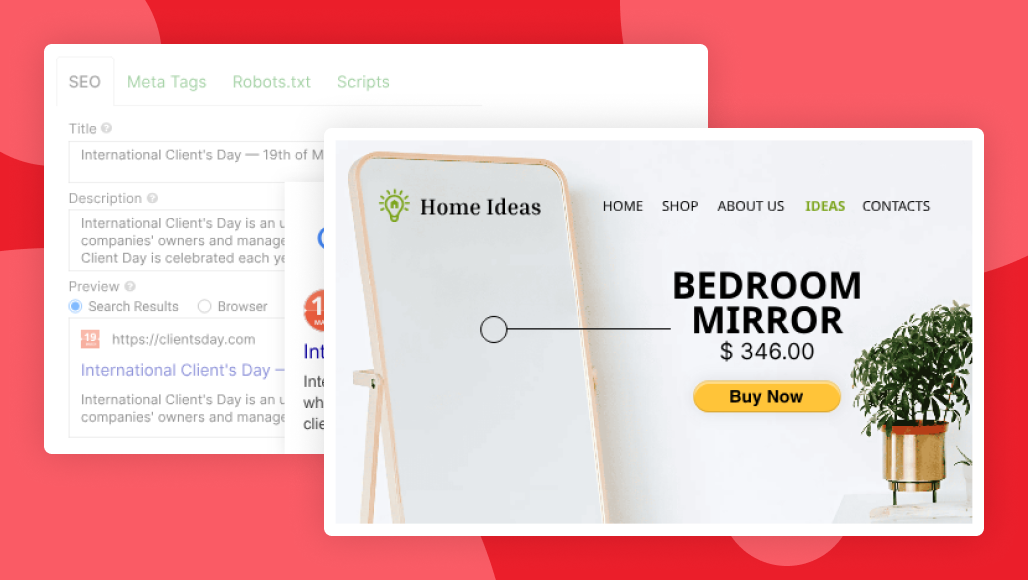
How meta information setting look in Site.proSite.pro interface for SEO settings

While you handle the content and keywords, your hosting provider handles the technical side (SSL, uptime, server speed), which also affects SEO.

Big hosting platforms (Namecheap, GoDaggy, Hostinger) include built-in security and updates, so you can focus on your business.

Myth #6: Users Know What to Do

You might expect that you will have perfect visitors that will naturally take action and do everything you planned for.

The unfortunate reality is that most users won’t do anything unless you clearly tell them what to do. People need big and obvious buttons and paths.

Use strong calls-to-action on every page:

  • Book now;
  • Get a quote;
  • Call today (+ your number);

Example of a call-to-action (CTA) buttonExample of a call-to-action (CTA) button

It’s a good idea to repeat a call-to-action button two times on one page. One on the top, and one on the bottom.

Myth #7: Just Build a Website and Forget About it

A website is a one-time project. It needs care and maintenance, just like a real office. Outdated websites lose trust and rankings, while fresh content can help you climb on top. Google likes new high quality content.

When possible, update regularly:

  • Add new photos, pricing, services when you change them;
  • Post updates or articles;
  • Keep business hours and contact info accurate;
  • If you have news within your company — post them on your website first.

Checklist: Is Your Website Good?

Not sure if your website is good enough? Time for research. Go through this checklist.

  1. Does it have clear call-to-action?
  2. Is it easy to read?
  3. Is it mobile-friendly? (check it yourself)
  4. Is all the information accurate? (old phone numbers, addresses, and legal info)
  5. Is loading speed fast? (more than 1 second is already slow)
  6. Can you find your website on Google? (type site:example.com in Google search)

To get a better understanding, let other people answer these questions too. This way, you’ll know what are your weak spots and how you can improve your website.

These are, actually, the first basic steps of Growth Hacking — a methodology that helped Airbnb, Dropbox and Facebook become the names we know today.

Experiments and user-first approach can start from your website, and you may end up among those big brand names one day.

7 Best Website Builders of 2025
© Site.pro 2011. Website Builder. United States.
Contact SalesTerms of ServicePrivacy Policy