Site.pro Site.pro
  • AI Website BuilderAI Website Builder
    • AI Website BuilderAI Website Builder
    • Online StoresOnline Stores
    • PricesPrices
    • CollaborationCollaboration
    • Website ImportWebsite Import
    • PluginsPlugins
    • Website BuilderWebsite Builder
    • TemplatesTemplates
    • For Design StudiosFor Design Studios
    • Useful LinksUseful Links
    • Affiliate ProgramAffiliate Program
    • We Build for YouWe Build for You
    • ExamplesExamples
    • LanguagesLanguages
  • DomainsDomains
    • Register Domain NameRegister Domain Name
    • Migrate DomainsMigrate Domains
    • For Domain InvestorsFor Domain Investors
    • Domain ZonesDomain Zones
    • DomainityDomainity
    • FAQ: DomainsFAQ: Domains
    • Popular Domain ZonesPopular Domain Zones
    • .com.com
    • .org.org
    • .net.net
    • .us.us
    • .co.co
  • EmailEmail
    • Free EmailFree Email
    • Email for BusinessEmail for Business
    • PricesPrices
    • Transfer EmailsTransfer Emails
    • Custom Domain EmailCustom Domain Email
    • FAQ: EmailFAQ: Email
    • Popular FAQsPopular FAQs
    • Email SetupEmail Setup
    • Auto ReplyAuto Reply
    • Auto ForwardingAuto Forwarding
    • Spam ProtectionSpam Protection
  • Accounting SoftwareAccounting Software
    • Accounting SoftwareAccounting Software
    • ModulesModules
    • PricesPrices
    • Integrations, APIIntegrations, API
    • Accounting Companies (389)Accounting Companies (389)
    • Software Integrators (52)Software Integrators (52)
    • Affiliate PartnersAffiliate Partners
    • Useful LinksUseful Links
    • Business TypesBusiness Types
    • Use CasesUse Cases
    • Accounting CompaniesAccounting Companies
    • Sole ProprietorSole Proprietor
    • InvoicingInvoicing
    • FarmerFarmer
    • E-commerceE-commerce
  • For ResellersFor Resellers
    • White LabelWhite Label
    • Revenue ShareRevenue Share
    • PricesPrices
    • PanelsPanels
    • How it WorksHow it Works
    • Marketing MaterialsMarketing Materials
    • Mass ImportMass Import
    • Our PartnersOur Partners
    • Reselling ExamplesReselling Examples
    • DocumentationDocumentation
    • Free WebsitesFree Websites
  • LearnLearn
    • Knowledge BaseKnowledge Base
    • BlogBlog
    • Growth HackingGrowth Hacking
    • For HostingsFor Hostings
    • For EducationFor Education
    • Website Сreation TutorialWebsite Сreation Tutorial
    • Teaching Institutions (69)Teaching Institutions (69)
    • Accounting Courses WorldwideAccounting Courses Worldwide
  • AI Website BuilderAI Website Builder
    • AI Website BuilderAI Website BuilderAI creates websites for you
    • Online StoresOnline StoresBuild online stores
    • PricesPricesAdvanced Features
    • CollaborationCollaborationCo-create websites live
    • Website ImportWebsite ImportImport Any Website
    • PluginsPluginsBuilder plugin and functions
    • Website BuilderWebsite BuilderKey Features
    • TemplatesTemplates200+ Awesome Templates
    • For Design StudiosFor Design StudiosBenefits for Design Studios
    • Useful LinksUseful Links
    • Affiliate ProgramAffiliate Program
    • We Build for YouWe Build for You
    • ExamplesExamples
    • LanguagesLanguages
  • DomainsDomains
    • Register Domain NameRegister Domain NameDomain registration, parking, transfer
    • Migrate DomainsMigrate DomainsTransfer. Connect. Renew
    • For Domain InvestorsFor Domain InvestorsDiscount on all domains
    • Domain ZonesDomain ZonesBuy New Domain Name
    • DomainityDomainityDomain usage by country
    • FAQ: DomainsFAQ: DomainsFind Answer
    • Popular Domain ZonesPopular Domain Zones
    • .com.com
    • .org.org
    • .net.net
    • .us.us
    • .co.co
  • EmailEmail
    • Free EmailFree EmailCreate email
    • Email for BusinessEmail for BusinessAdvanced features & protection
    • PricesPricesCheap email hosting
    • Transfer EmailsTransfer EmailsMigrate your mailboxes
    • Custom Domain EmailCustom Domain EmailEmail address with your domain
    • FAQ: EmailFAQ: EmailFind Answer
    • Popular FAQsPopular FAQs
    • Email SetupEmail Setup
    • Auto ReplyAuto Reply
    • Auto ForwardingAuto Forwarding
    • Spam ProtectionSpam Protection
  • Accounting SoftwareAccounting Software
    • Accounting SoftwareAccounting SoftwareCloud based ERP
    • ModulesModulesMain accounting software modules
    • PricesPrices30 days free trial
    • Integrations, APIIntegrations, APIIntegration with external systems
    • Accounting Companies (389)Accounting Companies (389)Choose your partner for accounting
    • Software Integrators (52)Software Integrators (52)Pick your integrations partner
    • Affiliate PartnersAffiliate PartnersPartners and Affiliate program
    • Useful LinksUseful LinksCalculators and Calendars
    • Business TypesBusiness TypesUse Cases
    • Use CasesUse Cases
    • Accounting CompaniesAccounting Companies
    • Sole ProprietorSole Proprietor
    • InvoicingInvoicing
    • FarmerFarmer
    • E-commerceE-commerce
  • For ResellersWhite LabelFor ResellersWhite Label
    • White LabelWhite LabelCustomise Builder
    • Revenue ShareRevenue ShareEarn 50% from each upgrade
    • PricesPricesRevenue Share. White Label
    • PanelsPanelsOne product for all platforms
    • How it WorksHow it WorksCloud or On-Premises
    • Marketing MaterialsMarketing MaterialsVideo. Mockups. Blocks
    • Mass ImportMass Import
    • Our PartnersOur Partners
    • Reselling ExamplesReselling Examples
    • DocumentationDocumentation
    • Free WebsitesFree Websites
  • LearnLearn
    • Knowledge BaseKnowledge BaseFAQ, Tutorial, Video
    • BlogBlogSite.pro Blog
    • Growth HackingGrowth HackingBoost your sales
    • For HostingsFor HostingsTips on marketing
    • For EducationFor EducationTraining. Tutorials
    • Website Сreation TutorialWebsite Сreation Tutorial
    • Teaching Institutions (69)Teaching Institutions (69)
    • Accounting Courses WorldwideAccounting Courses Worldwide
  • RegisterRegister
    Site.pro

    Create Your Account

    Get started — free and easy!

    Register

    By proceeding, you accept our Terms of Service and Privacy Policy
  • Log inLog in
    Site.pro

    Welcome back!

    Access your work space

    Log in

    New user? Create account
    Forgot password?
  • $
    $
  • EnglishEnglish
  • Hosting Tips (75)
  • Shared Hosting (20)
  • Web Design (19)
  • Marketing (8)
  • Education (10)
  • eCommerce (7)
  • Cloud Accounting (2)

Table of Contents:

Category
Search

Table of Contents:

Weebly Shuts Down. Why and What to Do to Save Your Website

Weebly Shuts Down. Why and What to Do to Save Your Website

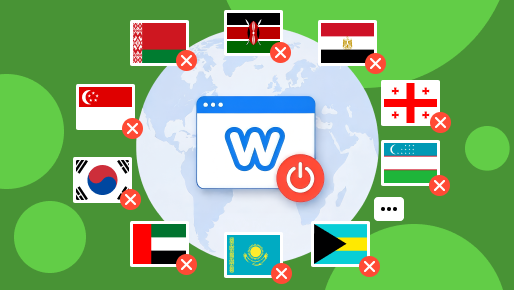
After Weebly was bought by Square in 2018, the platform gradually became more restrictive and less flexible. Now in 2026, Weebly users from 67 countries risk losing access to their website forever.

Here is the history of Weebly's development and acquisition, and how you can move your website from Weebly to a safe place.

Brief History of Weebly

Weebly was founded in 2006 at Penn State University. David Rusenko, Chris Fanini, and Dan Veltri built it because students struggled to create personal websites and publish resumes online. An invitation-only beta launched later that year.

The public launch came in March 2007 with the drag-and-drop editor that became Weebly's signature. It made website building accessible to people who could not code.

Between 2007 and 2015, Weebly grew fast. It added paid plans, blogging, HTML and CSS editing, mobile apps, multilingual support, and ecommerce. Early on, it was one of the best-known drag-and-drop builders on the market.

In 2018, Square (now called Block) agreed to buy Weebly for roughly $365 million. At the time, Weebly had millions of users and more than 625,000 paid subscribers. Square wanted website building and payments under one roof.

How Square Killed Weebly

The acquisition did not work out the way Weebly's users hoped.

Square launched Square Online in 2019 — a separate ecommerce product built with Weebly's technology underneath. New development shifted to Square Online. The classic Weebly editor got maintenance, security patches, and compatibility fixes — but nothing more.

A Square Community moderator said in February 2025 that the company did not plan further updates to the classic Weebly builder. No new editor. No modern templates. No AI builder. The classic platform was effectively frozen.

The Weebly mobile app stopped receiving updates too . Users had to link their Weebly login to a Square account, and account management moved to the Square Dashboard. But the products were never fully merged — a legacy Weebly site still opens in the old editor, and you cannot convert it to the new Square editor without rebuilding from scratch.

In 2025, a support page briefly said Weebly support would end in July 2025. Square removed the date and clarified they were not shutting Weebly down. But the confusion signaled where things were heading.

What Caused the Restrictions?

Weebly has blocked traffic from certain countries since at least 2019 — shortly after Square completed the acquisition.

Russian users reported their sites becoming inaccessible around April 2019. Ukrainian users reported the same reported the same. A Square moderator said Ghana traffic was blocked for security reasons. Users across the Middle East, West Africa, and Central Africa reported similar blocks.

Weebly never published an official list of which countries were restricted or why. The stated reason for the 2026 shutdown: "changes in regulation and simplifying global operations".

Here is what that means:

  • On June 29, 2026, users in the affected countries lost the ability to publish new pages.
  • On September 27, 2026, their websites will be unpublished.
  • On December 26, 2026, their Weebly accounts will be gone.

Weebly advised customers to download their website data and transfer domains before account access ends. Domain transfers take time — starting now is the only option.

The affected countries are:

AlbaniaCongoMauritiusSierra Leone
AlgeriaCosta RicaMoldovaSingapore
AndorraCote d'IvoireMontenegroSouth Korea
ArmeniaEcuadorMoroccoSuriname
ArubaEgyptNepalTaiwan
AzerbaijanEthiopiaNew CaledoniaTajikistan
BahamasFrench PolynesiaNigeriaTanzania
BahrainGabonOmanThailand
BangladeshGeorgiaPakistanTurkey
BarbadosGhanaPalauUganda
BelarusGuineaParaguayUkraine
BeninIcelandPeruUnited Arab Emirates
Bosnia and HerzegovinaJordanRussiaUruguay
CambodiaKazakhstanSaudi ArabiaUzbekistan
CameroonKenyaSenegalVietnam
ChileLaosSerbiaZambia
ColombiaMalaysiaZimbabwe

This is not exactly a worldwide shutdown — Weebly still operates outside the affected list. But for millions of users, the platform is ending forever.

So, what should you do, if your country is oon the list?

3 Ways to Save Your Website

You have three main options. Each has its pros and cons.

Use Site.pro's website import

Site.pro offers an automated import tool that pulls content from your Weebly site and converts it into the Site.pro format. The process handles pages, text, images, and structural elements.

After the website is imported, you can start using the AI assistant to help you to polish it where needed.

Pros:

  • Free;
  • Much faster than rebuilding by hand;
  • Preserves content structure;
  • Site.pro has a modern drag-and-drop editor with full AI assistance, collaboration tools, and ecommerce support;
  • No extra software needed — your website goes live almost instantly on the new platform.

Cons:

  • Some visual elements may need manual adjustment after import;
  • Ecommerce migration depends on the complexity of your store.

Export a Weebly zip archive

Weebly lets you download your data through Account Settings > My Data > Download My Data. You get a zip file with pages, images, and content.

Pros:

  • Free;
  • No third-party tool;
  • Works for basic content retrieval.

Cons:

  • The export is static HTML. Your layout, styling, and ecommerce configuration do not transfer cleanly anywhere else;
  • You still have to rebuild on another platform;
  • Product databases and customer data may not be included.

Rebuild your website from scratch

Pick a new platform and build the site again page by page.

Pros:

  • Complete design control;
  • You can fix everything that was outdated about your old site.

Cons:

  • Time-consuming. If you have a store with products and categories, this takes days or weeks;
  • Your SEO rankings will tank while the new site establishes itself;
  • You may lose content you cannot reproduce exactly.

How to Import your Website from Weebly to Site.pro

The process is straightforward:

  1. Go to Website Import;
  2. Enter your website's URL into the "Import" field;
  3. Press the green "Import" button;
  4. Register on Site.pro to save your imported website and connect domain.

Full instructions are on our FAQ page.

Website Import — Import Any Website to Site.pro Website Builder

The difference between losing your website and saving it comes down to what you do this month. September 27 is the hard deadline for unpublishing. December 26 is the hard deadline for account access. Start the export now, pick your migration route, and move before the window closes.

7 Best Website Builders of 2026
© Site.pro 2011. Website Builder. United States.
Contact SalesContact SalesTerms of ServiceTerms of ServicePrivacy PolicyPrivacy PolicyCookie SettingsCookie Settings