Site.pro
  • AI Website Builder
    • AI Website Builder
    • Prices
    • Online Stores
    • Collaboration
    • Website Import
    • Plugins
    • Website Builder
    • Templates
    • For Design Studios
    • Languages
    • Affiliate Program
    • Examples
    • For Domain Investors
    • We Build for You
  • Domains
  • Email
  • Accounting Software
    • Accounting Software
    • Modules
    • Prices
    • Integrations, API
    • Accounting companies (366)
    • Software integrators (48)
    • Sole Proprietor
    • Business Types
    • Invoice Recognition
    • Training
    • Affiliate Partners
    • Useful Links
  • For Resellers
    • Prices
    • White Label
    • Revenue Share
    • Panels
    • How it Works
    • Marketing Materials
    • Mass Import
    • Our Partners
    • Reselling Examples
    • Documentation
    • Free Websites
  • Learn
    • FAQ: Builder
    • Knowledge Base
    • Tutorials
    • Blog
    • Growth Hacking
    • For Hostings
    • Domainity
    • For Education
    • Accounting: Start of Work
    • Teaching Institutions (68)
    • Accounting Courses Worldwide
    • Online Course on UAE Accounting
  • AI Website Builder
    • AI Website BuilderAI creates websites for you
    • PricesGet more website builder features
    • Online StoresBuild online stores
    • CollaborationCreate websites together in real-time
    • Website ImportImport Any Website
    • PluginsBuilder plugin and functions
    • Website BuilderKey Features
    • Templates200+ Awesome Templates
    • For Design StudiosBenefits for Design Studios
    • Languages
    • Affiliate Program
    • Examples
    • For Domain Investors
    • We Build for You
  • Domains
  • Email
  • Accounting Software
    • Accounting SoftwareCloud based ERP
    • ModulesMain accounting software modules
    • Prices30 days free trial
    • Integrations, APIIntegration with external systems
    • Accounting companies (366)Choose your partner for accounting
    • Software integrators (48)Pick your integrations partner
    • Sole ProprietorAccounting of individual activities
    • Business Types
    • Invoice Recognition
    • Training
    • Affiliate Partners
    • Useful Links
  • For ResellersWhite Label
    • PricesRevenue Share. White Label
    • White LabelCustomise Builder
    • Revenue ShareEarn 50% from each upgrade
    • PanelsOne product for all platforms
    • How it WorksCloud or On-Premises
    • Marketing MaterialsVideo. Mockups. Website Blocks
    • Mass Import
    • Our Partners
    • Reselling Examples
    • Documentation
    • Free Websites
  • Learn
    • FAQ: BuilderFind Answer
    • Knowledge BaseRegarding accounting software
    • TutorialsDownload video tutorials for free
    • BlogSite.pro Blog
    • Growth HackingBoost your sales
    • For HostingsTips on marketing
    • DomainityDomain usage by country
    • For EducationTraining. Tutorials. Resources
    • Accounting: Start of Work
    • Teaching Institutions (68)
    • Accounting Courses Worldwide
    • Online Course on UAE Accounting
  • Register
    By registering, you accept our Terms of Service
  • Log in

    Log in

    New user? Create account
    Forgot password?
  • $
  • English

Ideal Website Builder for Your DirectAdmin

100% White Label

Product Features

E-commerce Sell your goods or services anywhere on the website
AI Website Builder Create your website easily and for free with AI
Website Import Website import from different website builders
Collaboration Create a website with teammates in real-time in one space
200 Templates Newest templates and updates
Many Plugins Many functions and plugins depending on geographical preferences
SEO Make your website more visible for search engines by using our SEO
50 languages Localised product (local language, plugins, payment gateways, …)
Easy To Use Easy to use website builder

Plugin for DirectAdmin Installation Guide

Just few minutes and plugin appears in DirectAdmin for your customers

Reference:

  • Installation
  • Update
  • Reinstall
  • Troubleshooting

Installation

  1. Open DirectAdmin server console SSH and login as root (it is required for the user to be exactly "root", other users - even with root privileges - may not have all required permissions for plugin installation).
    How to connect to server console via SSH
  2. Execute installation command:
    [code will appear after you log in or sign up]
    You should see message "OK!"
  3. Download file [link will appear after you log in or sign up] to your computer.
    Important: Make sure that file name is "siteprobuilder.tar.gz". Rename it if needed.
  4. Login to DirectAdmin with admin user. It is neccessary for admin user to have username "admin".
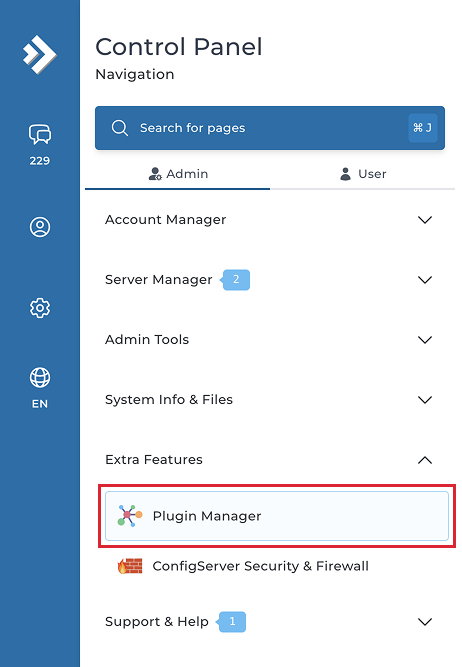
  5. Navigate to "Extra features" → "Plugin Manager":
    DirectAdmin sidebar
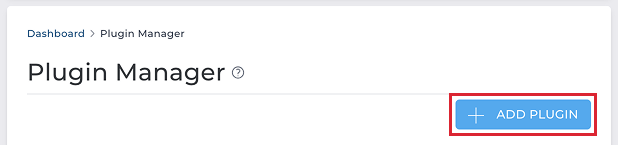
  6. Click on "+ Add plugin":
    DirectAdmin Add plugin button
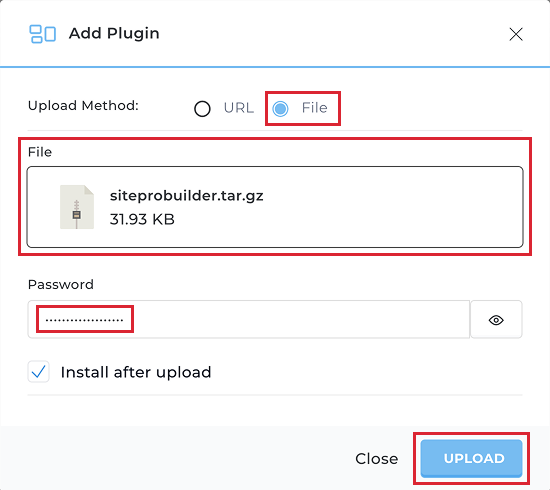
  7. Select "File" method, upload file "siteprobuilder.tar.gz", type in admin password and click "Upload":
    DirectAdmin upload plugin dialog
  8. Important Whitelist Site.pro IPs (if they are not allowed by default) on DirectAdmin server firewall
    You may have one of these firewalls: iptables, firewalld, UFW or other.
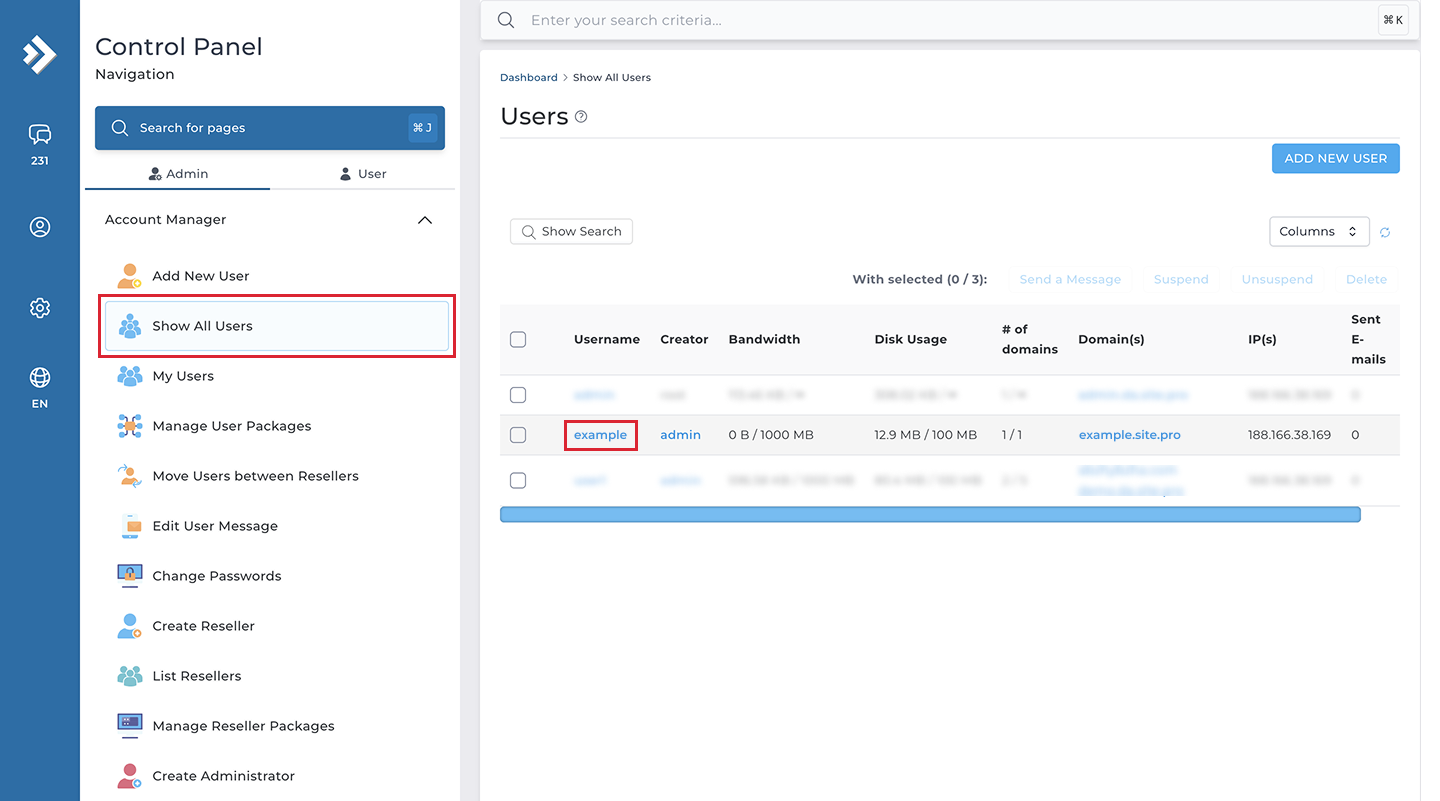
  9. Navigate to "Account Manager" → "Show All Users", choose any user and click on "Login as username":
    DirectAdmin show all users

    DirectAdmin login as user
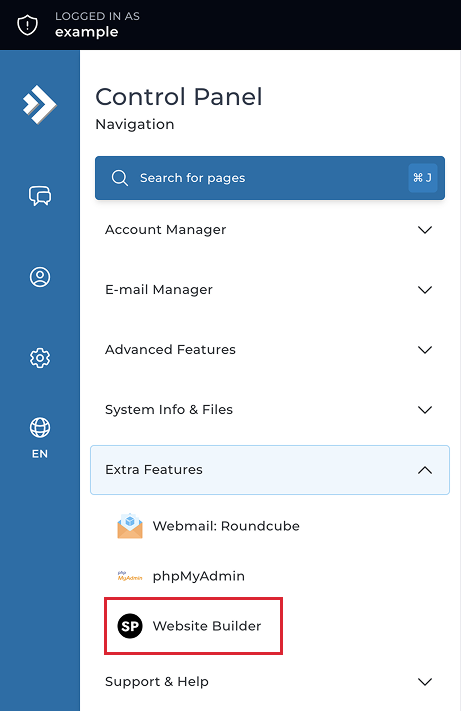
  10. Click on "Website Builder" icon in "Extra Features":
    DirectAdmin login as user
  11. Make sure that website builder opens successfully.
Installation using CLI

Installation script can also be executed using CLI for automated installs (without requiring user interaction):
curl -L -XPOST "[direct-admin-panel-url]/CMD_PLUGIN_MANAGER" -H "Authorization: Basic base64_encode("[panel-user]:[panel-password]")" -F "passwd=[panel-password]" -F "install=yes" -F "json=yes" -F "action=add" -F "type=file" -F "MAX_FILE_SIZE=10485760" -F "file1=@[path-to-plugin-archive].tar.gz;type=application/x-gzip"
Important:
When running CLI installer will verify PHP CLI configuration and not the actual PHP configuration that will be used for running builder. Make sure they match.

Note:
Make the plugin visible in a reseller package if it was not set by default.

Update

To update the plugin to the latest version, take the following steps:

  1. Login to DirectAdmin with admin user.
  2. Go to "Plugin Manager" item in "Extra Features" section.
  3. Click on "+" button in the right for the builder plugin and choose "Update" option.
  4. Type the admin password and click "Confirm" button.

Reinstall

If you need to reinstall the plugin when it already has the latest version, take the following steps:

  1. Login to DirectAdmin with admin user.
  2. Go to "Plugin Manager" item in "Extra Features" section.
  3. Click on "+" button in the right for the builder plugin and choose "Delete" option.
  4. Type the admin password and click "Confirm" button.
  5. Follow installation instruction to install the plugin anew.

Troubleshooting

Error communicating with DirectAdmin server - login failed
Zip download error (code: 0)
Website builder not working with DirectAdmin Evolution skin
Error "File is not open" during publication
Error response code (502) from Publish API
Server error (6): Fatal error: Allowed memory size exhausted
What are the DirectAdmin PHP 5.6 (or newer) requirements?
Could not connect to Hosting API

About DirectAdmin

DirectAdmin is the easiest to use Linux control panel. DirectAdmin has been programmed to be the fastest. Succeeding in the web hosting business requires flexibility which DirectAdmin offers. Fast running and stable graphical web-based hosting control panel designed to make administration of websites easier.
Site.pro DirectAdmin Plugins
© Site.pro 2011. Website Builder. United States.
Contact SalesTerms of ServicePrivacy Policy