Site.pro
  • AI Website Builder
    • AI Website Builder
    • Prices
    • Online Stores
    • Collaboration
    • Website Import
    • Plugins
    • Website Builder
    • Templates
    • For Design Studios
    • Useful Links
    • Affiliate Program
    • We Build for You
    • Examples
    • Languages
  • Domains
    • Register Domain Name
    • Migrate Domains
    • For Domain Investors
    • Domain Zones
    • Domainity
    • FAQ: Domains
    • Popular Domain Zones
    • .com
    • .org
    • .net
    • .us
    • .co
  • Email
    • Free Email
    • Email for Business
    • Prices
    • Transfer Emails
    • Custom Domain Email
    • FAQ: Email
    • Popular FAQs
    • Email Setup
    • Auto Reply
    • Auto Forwarding
    • Spam Protection
  • Accounting Software
    • Accounting Software
    • Modules
    • Prices
    • Integrations, API
    • Accounting companies (374)
    • Software integrators (52)
    • Affiliate Partners
    • Useful Links
    • Business Types
    • Use Cases
    • Accounting companies
    • Sole Proprietor
    • Invoicing
    • Farmer
    • E-commerce
  • For Resellers
    • Prices
    • White Label
    • Revenue Share
    • Panels
    • How it Works
    • Marketing Materials
    • Mass Import
    • Our Partners
    • Reselling Examples
    • Documentation
    • Free Websites
  • Learn
    • Knowledge Base
    • Tutorials
    • Blog
    • Growth Hacking
    • For Hostings
    • For Education
    • Accounting: Start of Work
    • Teaching Institutions (68)
    • Accounting Courses Worldwide
  • AI Website Builder
    • AI Website BuilderAI creates websites for you
    • PricesAdvanced Features
    • Online StoresBuild online stores
    • CollaborationCo-create websites live
    • Website ImportImport Any Website
    • PluginsBuilder plugin and functions
    • Website BuilderKey Features
    • Templates200+ Awesome Templates
    • For Design StudiosBenefits for Design Studios
    • Useful Links
    • Affiliate Program
    • We Build for You
    • Examples
    • Languages
  • Domains
    • Register Domain NameDomain registration, parking, transfer
    • Migrate DomainsTransfer. Connect. Renew
    • For Domain InvestorsDiscount on all domains
    • Domain ZonesBuy New Domain Name
    • DomainityDomain usage by country
    • FAQ: DomainsFind Answer
    • Popular Domain Zones
    • .com
    • .org
    • .net
    • .us
    • .co
  • Email
    • Free EmailCreate email
    • Email for BusinessAdvanced features & protection
    • PricesCheap email hosting
    • Transfer EmailsMigrate your mailboxes
    • Custom Domain EmailEmail address with your domain
    • FAQ: EmailFind Answer
    • Popular FAQs
    • Email Setup
    • Auto Reply
    • Auto Forwarding
    • Spam Protection
  • Accounting Software
    • Accounting SoftwareCloud based ERP
    • ModulesMain accounting software modules
    • Prices30 days free trial
    • Integrations, APIIntegration with external systems
    • Accounting companies (374)Choose your partner for accounting
    • Software integrators (52)Pick your integrations partner
    • Affiliate PartnersPartners and Affiliate program
    • Useful LinksCalculators and Calendars
    • Business TypesUse Cases
    • Use Cases
    • Accounting companies
    • Sole Proprietor
    • Invoicing
    • Farmer
    • E-commerce
  • For ResellersWhite Label
    • PricesRevenue Share. White Label
    • White LabelCustomise Builder
    • Revenue ShareEarn 50% from each upgrade
    • PanelsOne product for all platforms
    • How it WorksCloud or On-Premises
    • Marketing MaterialsVideo. Mockups. Blocks
    • Mass Import
    • Our Partners
    • Reselling Examples
    • Documentation
    • Free Websites
  • Learn
    • Knowledge BaseFAQ: Builder, Accounting
    • TutorialsDownload for free
    • BlogSite.pro Blog
    • Growth HackingBoost your sales
    • For HostingsTips on marketing
    • For EducationTraining. Tutorials
    • Accounting: Start of Work
    • Teaching Institutions (68)
    • Accounting Courses Worldwide
  • Register
    By proceeding, you accept our Terms of Service and Privacy Policy
  • Log in

    Log in

    New user? Create account
    Forgot password?
  • $
  • English
  • AI Website Builder (331)
    • Managing Website (14)
    • Website Builder (295)
      • Website creation (59)
      • Text (14)
      • Pictures (11)
      • Media (15)
      • Additional (8)
      • Social (13)
      • SEO (22)
      • Import (7)
      • Commerce (82)
      • Maps (12)
      • Advanced (19)
      • Forms (7)
      • Errors (21)
      • Custom plugins (5)
    • Web Design Studio (3)
    • Affiliate Program (9)
    • Education (10)
  • Account & Billing (32)
    • Account / Profile (8)
    • Payments (7)
  • Domains (42)
    • Purchasing (15)
    • Domain Investors (1)
    • Connecting (26)
  • Mailboxes (27)
  • Accounting Software (682)
    • Dashboard (company) (13)
    • Warehouse (118)
      • Sales (49)
      • Simplified invoicing (5)
      • Client prices (1)
      • Automatic invoicing (1)
      • Purchases (28)
      • Sales return (6)
      • Item stock (1)
      • Item movement (1)
      • Consignment balance (1)
      • Inventory (1)
      • Revalue (1)
      • Internal movement confirmation (1)
      • E-commerce (17)
      • Cash register sales (5)
    • General ledger (29)
      • General register (16)
      • Doc. settlement (2)
      • Period closure (1)
      • Currency exchange rate range (2)
      • Financial accountability articles (1)
      • Cost centers (2)
      • Chart of accounts (4)
    • Bank (31)
      • Bank (11)
      • Bank link with cor. account (2)
      • Import statements (14)
      • SEPA payments (4)
    • Cashier (4)
      • Cashier (2)
      • Money receiving receipts (1)
      • Reference book (1)
    • Reports (33)
      • Inventory report (8)
      • General ledger reports (9)
      • Ind. activity report (1)
      • Sales-purchases (4)
      • Debt management (4)
      • Balances / PLN (2)
      • Other reports (3)
    • Personnel (22)
      • Employees (17)
      • Requests (1)
      • CV (1)
      • Reference book (3)
        • Job positions (1)
        • Request types (2)
    • Reference book (19)
      • Item cards (5)
      • Warehouse (7)
        • Warehouses (2)
        • Operation types (5)
      • Intrastat (2)
      • Locations (1)
      • Banks (1)
      • Currencies (2)
      • Currency exchange rates (1)
    • Production (5)
      • Technological cards (1)
      • Production from technological cards (2)
      • Bundle / debundle (2)
    • Assets (15)
      • Long-term assets (13)
      • Low value assets (1)
      • General report (1)
    • Documents (31)
      • Orders (15)
        • Orders (8)
        • Order attributes (5)
        • Daily allowance (2)
      • Insurance (1)
      • Agreements (1)
      • Emails registry (2)
      • Outgoing mail register (1)
      • Incoming / Outgoing document register (1)
      • Annual leave (6)
        • Accumulated holiday days (2)
        • Vacation balances (3)
      • Incapacity certificate (2)
      • Internal documents (2)
    • Salary (45)
      • Payroll (25)
      • Timesheets (6)
      • Work schedule (1)
      • Wage prints (11)
      • Reference book (2)
        • Wage codes (Registers) (2)
    • Declaration (43)
      • Generate declarations (16)
      • Declaration signs (1)
      • i.VAZ (14)
        • Clients (11)
      • i.SAF (5)
      • SAF-T (1)
      • GPAIS (6)
    • Settings (142)
      • Settings (27)
        • System and logos (6)
        • Sales (4)
        • Accounting (6)
        • Declarations (1)
        • Data exchange (2)
        • Users / employees (1)
        • Invoices recognition (1)
        • Additional employee attributes (1)
        • Additional item attributes (1)
        • Additional sale attributes (1)
        • Approval of documents (1)
        • Self-employed (1)
        • Sending invoices by email (1)
      • Integrations (106)
        • API (22)
          • API (13)
          • API #2 (5)
        • Plugins for E-shops (4)
          • WooCommerce (1)
          • PrestaShop (1)
          • Opencart (1)
          • Adobe Commerce (Magento) (1)
        • Trading Platforms (27)
          • eBay (2)
          • Amazon (3)
          • Shopify (4)
          • Etsy (9)
          • Site.pro (5)
          • Varle.lt (1)
          • Verskis (1)
          • Pigu.lt (1)
        • Cash registers (16)
          • Paysera POS (1)
          • Čekis cash register (1)
          • Raso cash registers (12)
          • R-Keeper (1)
          • nSoft (1)
        • Paysera (2)
        • Automatic import of bank statements (5)
        • Creditonline.eu (1)
        • MIP (4)
        • Analytics (2)
      • Data import (9)
    • Account (118)
      • Dashboard (25)
      • Companies and users (29)
      • File upload (8)
      • Employee account (5)
      • My data (18)
      • Affiliate program (4)
      • Invites (2)
      • Reminders (2)
      • Support (7)
        • How to book the program training? (1)
      • Statistics (4)
      • Other information (14)
    • Encyclopedia (14)
  • For Resellers (106)
    • Brand (Cloud, On-Premises) (19)
      • Cloud (5)
      • On-Premises (14)
    • License (34)
    • Installation (16)
      • Website Builder (11)
      • Website Builder Plugin (5)
    • Hosting/Billing Panels (37)
      • WHMCS (5)
      • cPanel (9)
      • DirectAdmin (8)
      • ISPmanager (4)
      • Plesk (7)
      • Webuzo (2)
      • CentOS Web Panel (2)

Table of Contents:

Category
Search
Filter
  • All (1265)
  • AI Website Builder (340)
  • Domains (57)
  • Email (39)
  • For Resellers (423)
  • Accounting Software (728)
  • Table of Contents:

    Who can see analytics data?

    1. The “Analytics” module is displayed by default to users who have been assigned the “Executive” and “Accountant” permission sets.
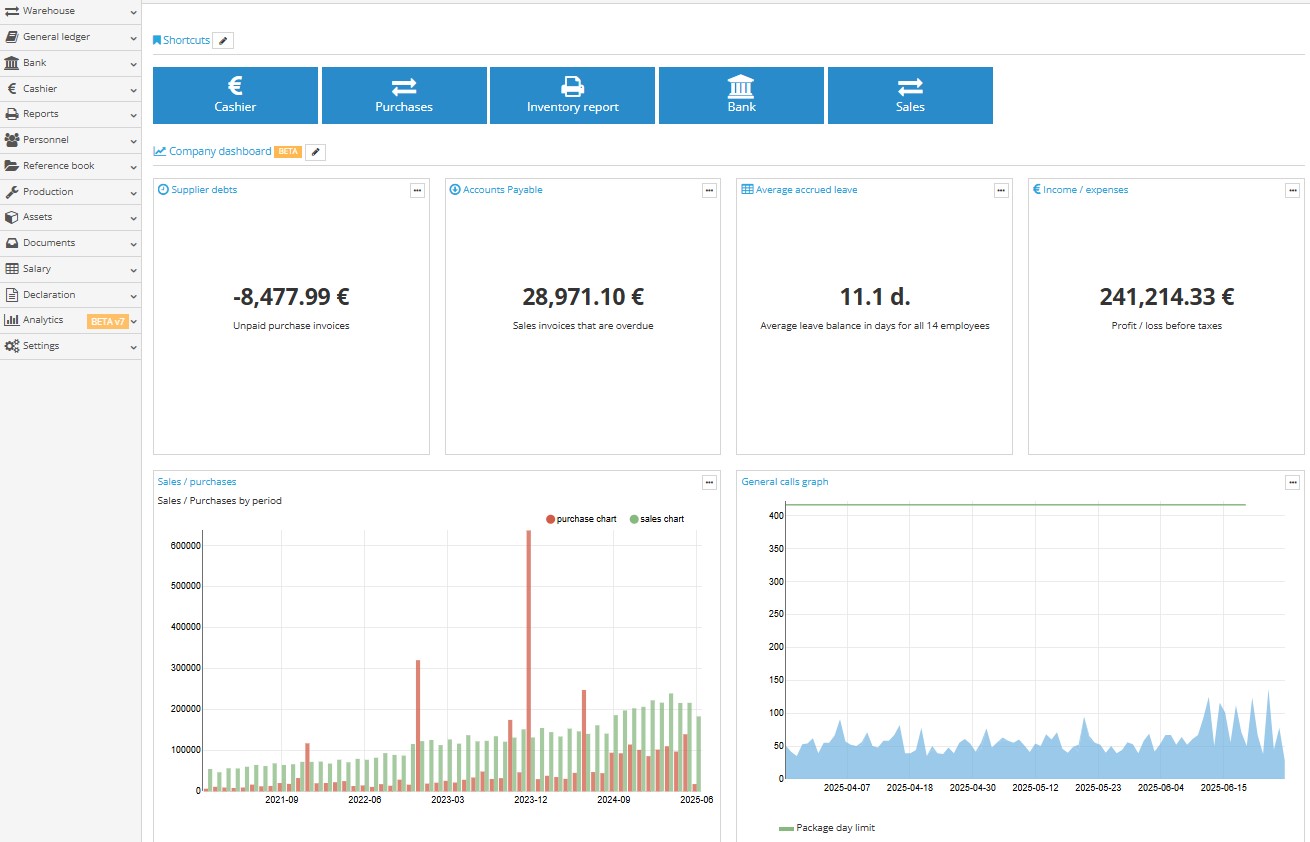
    2. The “Company Dashboard” is displayed on the company desktop, with data shown according to the permissions granted to the user, so each user sees only the information available to them.

      The “Company Dashboard” on the desktop can be easily customised as needed – users can change the layout, size, or remove fields that are not required. To make these changes, click the pencil icon “” next to the “Company Dashboard”.

      Editing the company dashboard on the desktop

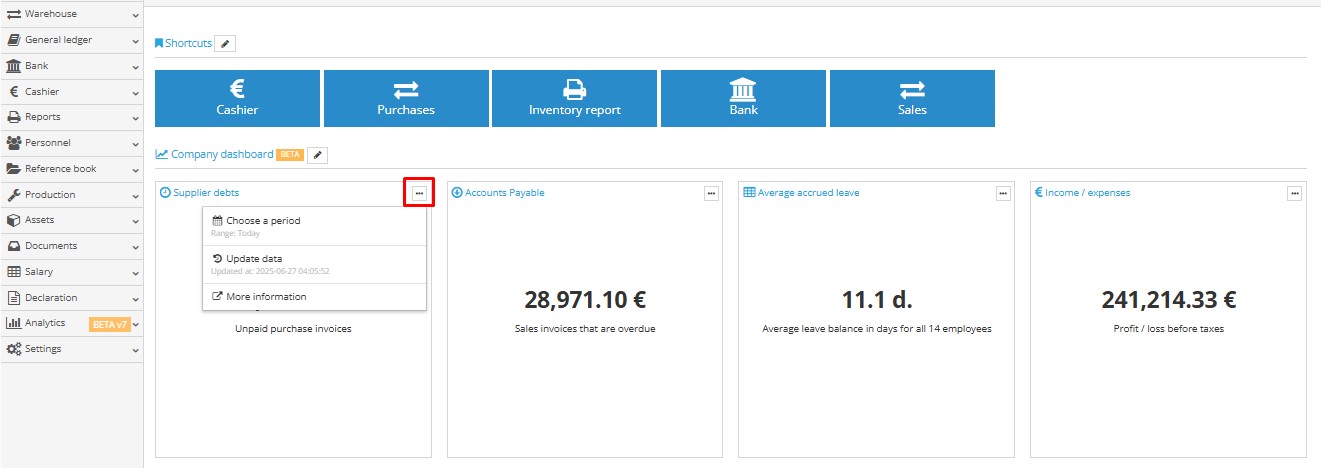
    3. Data is updated automatically by default once per day (i.e. at night). However, if faster updates are required, users can manually update the data by clicking the update button:

      Manual data update button in Analytics module
    4. If the user is using:

      • a custom permission set – it is sufficient to modify it. Access to the “Analytics” module is granted by the database administrator by selecting this module in the permission set;
      • a system permission set, but access to “Analytics” is not granted – a new custom permission set must be created, as standard sets cannot be modified.

    Actions:

    Account → Companies and Users
    • Check which permission set is assigned to the user;
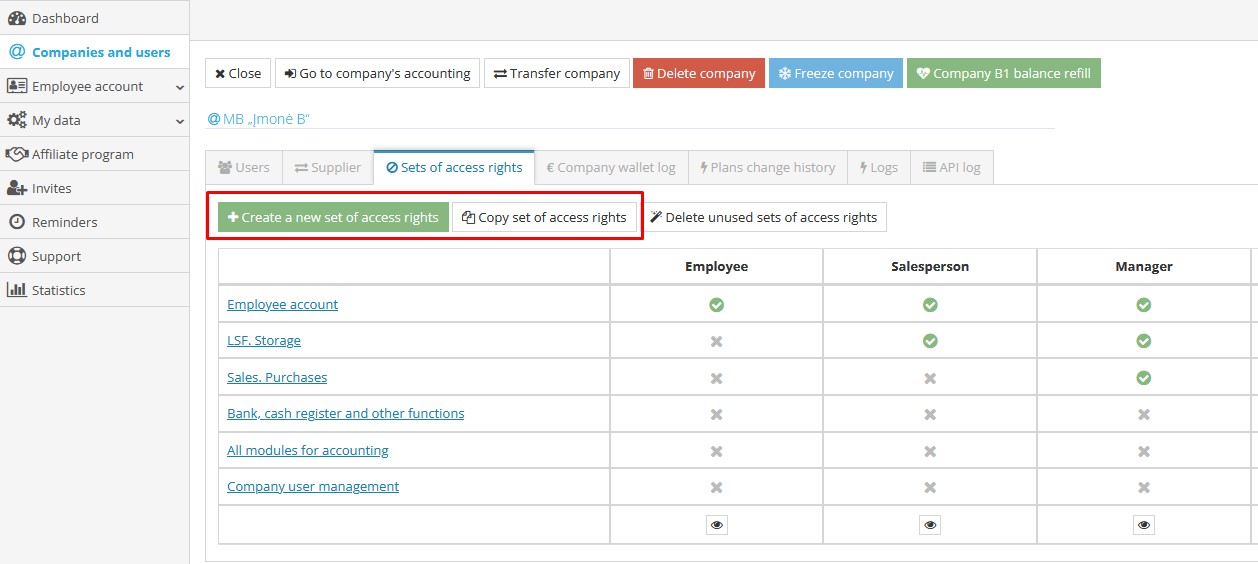
    • To create a new permission set – in the “Permission Sets” section, select “Copy Permission Set”, choose the existing set and the company where it will be saved;
    • Copying a permission set and assigning it to a company
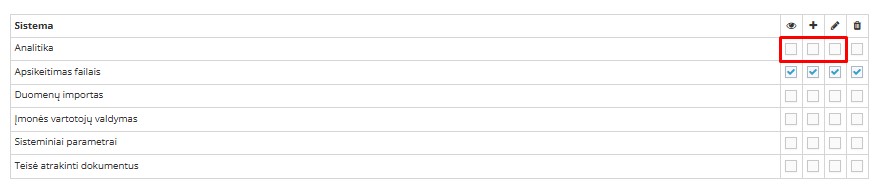
    • Edit the created set and additionally enable the “Analytics” module;
    • Enabling Analytics module in permission set
    • Save the changes;
    • In the “Users” section, assign the new permission set with Analytics to the employee: To change a user’s permissions, click the blue “Change set of access rights” button, select the appropriate set from the list, and click “Save”.
    Note. Permissions can be assigned or changed by a user who has the “Executive” permission set. “System permission sets” cannot be modified — they can only be viewed by clicking the button.
    FAQ
    ›
    Accounting Software
    ›
    Settings
    ›
    Integrations
    ›
    Analytics
    Accounting Software

    Who can see analytics data?

    1. The “Analytics” module is displayed by default to users who have been assigned the “Executive” and “Accountant” permission sets.
    2. The “Company Dashboard” is displayed on the company desktop, with data shown according to the permissions granted to the user, so each user sees only the information available to them.

      The “Company Dashboard” on the desktop can be easily customised as needed – users can change the layout, size, or remove fields that are not required. To make these changes, click the pencil icon “” next to the “Company Dashboard”.

      Editing the company dashboard on the desktop

    3. Data is updated automatically by default once per day (i.e. at night). However, if faster updates are required, users can manually update the data by clicking the update button:

      Manual data update button in Analytics module
    4. If the user is using:

      • a custom permission set – it is sufficient to modify it. Access to the “Analytics” module is granted by the database administrator by selecting this module in the permission set;
      • a system permission set, but access to “Analytics” is not granted – a new custom permission set must be created, as standard sets cannot be modified.

    Actions:

    Account → Companies and Users
    • Check which permission set is assigned to the user;
    • To create a new permission set – in the “Permission Sets” section, select “Copy Permission Set”, choose the existing set and the company where it will be saved;
    • Copying a permission set and assigning it to a company
    • Edit the created set and additionally enable the “Analytics” module;
    • Enabling Analytics module in permission set
    • Save the changes;
    • In the “Users” section, assign the new permission set with Analytics to the employee: To change a user’s permissions, click the blue “Change set of access rights” button, select the appropriate set from the list, and click “Save”.
    Note. Permissions can be assigned or changed by a user who has the “Executive” permission set. “System permission sets” cannot be modified — they can only be viewed by clicking the button.

    People also found this article using these queries:

    • Who is able to view analytics data
    • Who has access to analytics data
    • Who can review analytics data
    • Who is permitted to see analytics data
    • Who is authorized to access analytics data
    • Who can examine analytics data
    • Who is allowed to view analytics data
    • Who can check analytics data
    • Who is enabled to see analytics data
    • Who can monitor analytics data
    • Who is granted access to analytics data
    • Who is capable of seeing analytics data
    • Who can inspect analytics data
    • Who may view analytics data
    • Who can look at analytics data
    • Who is entitled to see analytics data
    • Who is able to access analytics data
    • Who can observe analytics data
    • Who has permission to view analytics data
    © Site.pro 2011. Website Builder. United States.
    Contact SalesTerms of ServicePrivacy Policy