Site.pro Site.pro
  • AI Website BuilderAI Website Builder
    • AI Website BuilderAI Website Builder
    • Online StoresOnline Stores
    • PricesPrices
    • CollaborationCollaboration
    • Website ImportWebsite Import
    • PluginsPlugins
    • Website BuilderWebsite Builder
    • TemplatesTemplates
    • For Design StudiosFor Design Studios
    • Useful LinksUseful Links
    • Affiliate ProgramAffiliate Program
    • We Build for YouWe Build for You
    • ExamplesExamples
    • LanguagesLanguages
  • DomainsDomains
    • Register Domain NameRegister Domain Name
    • Migrate DomainsMigrate Domains
    • For Domain InvestorsFor Domain Investors
    • Domain ZonesDomain Zones
    • DomainityDomainity
    • FAQ: DomainsFAQ: Domains
    • Popular Domain ZonesPopular Domain Zones
    • .com.com
    • .org.org
    • .net.net
    • .us.us
    • .co.co
  • EmailEmail
    • Free EmailFree Email
    • Email for BusinessEmail for Business
    • PricesPrices
    • Transfer EmailsTransfer Emails
    • Custom Domain EmailCustom Domain Email
    • FAQ: EmailFAQ: Email
    • Popular FAQsPopular FAQs
    • Email SetupEmail Setup
    • Auto ReplyAuto Reply
    • Auto ForwardingAuto Forwarding
    • Spam ProtectionSpam Protection
  • Accounting SoftwareAccounting Software
    • Accounting SoftwareAccounting Software
    • ModulesModules
    • PricesPrices
    • Integrations, APIIntegrations, API
    • Accounting Companies (389)Accounting Companies (389)
    • Software Integrators (52)Software Integrators (52)
    • Affiliate PartnersAffiliate Partners
    • Useful LinksUseful Links
    • Business TypesBusiness Types
    • Use CasesUse Cases
    • Accounting CompaniesAccounting Companies
    • Sole ProprietorSole Proprietor
    • InvoicingInvoicing
    • FarmerFarmer
    • E-commerceE-commerce
  • For ResellersFor Resellers
    • White LabelWhite Label
    • Revenue ShareRevenue Share
    • PricesPrices
    • PanelsPanels
    • How it WorksHow it Works
    • Marketing MaterialsMarketing Materials
    • Mass ImportMass Import
    • Our PartnersOur Partners
    • Reselling ExamplesReselling Examples
    • DocumentationDocumentation
    • Free WebsitesFree Websites
  • LearnLearn
    • Knowledge BaseKnowledge Base
    • BlogBlog
    • Growth HackingGrowth Hacking
    • For HostingsFor Hostings
    • For EducationFor Education
    • Website Сreation TutorialWebsite Сreation Tutorial
    • Teaching Institutions (69)Teaching Institutions (69)
    • Accounting Courses WorldwideAccounting Courses Worldwide
  • AI Website BuilderAI Website Builder
    • AI Website BuilderAI Website BuilderAI creates websites for you
    • Online StoresOnline StoresBuild online stores
    • PricesPricesAdvanced Features
    • CollaborationCollaborationCo-create websites live
    • Website ImportWebsite ImportImport Any Website
    • PluginsPluginsBuilder plugin and functions
    • Website BuilderWebsite BuilderKey Features
    • TemplatesTemplates200+ Awesome Templates
    • For Design StudiosFor Design StudiosBenefits for Design Studios
    • Useful LinksUseful Links
    • Affiliate ProgramAffiliate Program
    • We Build for YouWe Build for You
    • ExamplesExamples
    • LanguagesLanguages
  • DomainsDomains
    • Register Domain NameRegister Domain NameDomain registration, parking, transfer
    • Migrate DomainsMigrate DomainsTransfer. Connect. Renew
    • For Domain InvestorsFor Domain InvestorsDiscount on all domains
    • Domain ZonesDomain ZonesBuy New Domain Name
    • DomainityDomainityDomain usage by country
    • FAQ: DomainsFAQ: DomainsFind Answer
    • Popular Domain ZonesPopular Domain Zones
    • .com.com
    • .org.org
    • .net.net
    • .us.us
    • .co.co
  • EmailEmail
    • Free EmailFree EmailCreate email
    • Email for BusinessEmail for BusinessAdvanced features & protection
    • PricesPricesCheap email hosting
    • Transfer EmailsTransfer EmailsMigrate your mailboxes
    • Custom Domain EmailCustom Domain EmailEmail address with your domain
    • FAQ: EmailFAQ: EmailFind Answer
    • Popular FAQsPopular FAQs
    • Email SetupEmail Setup
    • Auto ReplyAuto Reply
    • Auto ForwardingAuto Forwarding
    • Spam ProtectionSpam Protection
  • Accounting SoftwareAccounting Software
    • Accounting SoftwareAccounting SoftwareCloud based ERP
    • ModulesModulesMain accounting software modules
    • PricesPrices30 days free trial
    • Integrations, APIIntegrations, APIIntegration with external systems
    • Accounting Companies (389)Accounting Companies (389)Choose your partner for accounting
    • Software Integrators (52)Software Integrators (52)Pick your integrations partner
    • Affiliate PartnersAffiliate PartnersPartners and Affiliate program
    • Useful LinksUseful LinksCalculators and Calendars
    • Business TypesBusiness TypesUse Cases
    • Use CasesUse Cases
    • Accounting CompaniesAccounting Companies
    • Sole ProprietorSole Proprietor
    • InvoicingInvoicing
    • FarmerFarmer
    • E-commerceE-commerce
  • For ResellersWhite LabelFor ResellersWhite Label
    • White LabelWhite LabelCustomise Builder
    • Revenue ShareRevenue ShareEarn 50% from each upgrade
    • PricesPricesRevenue Share. White Label
    • PanelsPanelsOne product for all platforms
    • How it WorksHow it WorksCloud or On-Premises
    • Marketing MaterialsMarketing MaterialsVideo. Mockups. Blocks
    • Mass ImportMass Import
    • Our PartnersOur Partners
    • Reselling ExamplesReselling Examples
    • DocumentationDocumentation
    • Free WebsitesFree Websites
  • LearnLearn
    • Knowledge BaseKnowledge BaseFAQ, Tutorial, Video
    • BlogBlogSite.pro Blog
    • Growth HackingGrowth HackingBoost your sales
    • For HostingsFor HostingsTips on marketing
    • For EducationFor EducationTraining. Tutorials
    • Website Сreation TutorialWebsite Сreation Tutorial
    • Teaching Institutions (69)Teaching Institutions (69)
    • Accounting Courses WorldwideAccounting Courses Worldwide
  • RegisterRegister
    Site.pro

    Create Your Account

    Get started — free and easy!

    Register

    By proceeding, you accept our Terms of Service and Privacy Policy
  • Log inLog in
    Site.pro

    Welcome back!

    Access your work space

    Log in

    New user? Create account
    Forgot password?
  • $
    $
  • EnglishEnglish
  • AI Website Builder (338)
    • Managing Website (15)
    • Website Builder (301)
      • Website creation (63)
      • Text (14)
      • Pictures (11)
      • Media (15)
      • Additional (8)
      • Social (13)
      • SEO (23)
      • Import (7)
      • Commerce (83)
      • Maps (12)
      • Advanced (19)
      • Forms (7)
      • Errors (21)
      • Custom plugins (5)
    • Web Design Studio (3)
    • Affiliate Program (9)
    • Education (10)
  • Account & Billing (31)
    • Account / Profile (7)
    • Payments (7)
  • Domains (43)
    • Purchasing (16)
    • Domain Investors (1)
    • Connecting (26)
  • Mailboxes (28)
  • Accounting Software (699)
    • Dashboard (company) (13)
    • Clients (11)
    • Warehouse (120)
      • Sales (51)
      • Simplified invoicing (5)
      • Client prices (1)
      • Automatic invoicing (1)
      • Purchases (28)
      • Sales return (5)
      • Item stock (1)
      • Prekės judėjimas (1)
      • Consignment balance (2)
      • Inventory (1)
      • Perkainavimas (1)
      • Internal movement confirmation (1)
      • E-commerce (17)
      • Cash register sales (5)
    • General ledger (29)
      • General register (15)
      • Doc. settlement (2)
      • Period closure (1)
      • Currency exchange rate range (2)
      • Financial accountability articles (2)
      • Cost centers (2)
      • Chart of accounts (4)
    • Bank (30)
      • Bank (11)
      • Bank link with cor. account (1)
      • Import statements (14)
      • SEPA payments (4)
    • Cashier (4)
      • Cashier (2)
      • Money receiving receipts (1)
      • Žinynai (1)
    • Reports (32)
      • Inventory report (7)
      • General ledger reports (9)
      • Ind. activity report (1)
      • Sales-purchases (4)
      • Debt management (4)
      • Balances / PLN (2)
      • Other reports (3)
    • Personnel (23)
      • Employees (18)
      • Requests (1)
      • CV (1)
      • Žinynai (3)
        • Pareigos (1)
        • Request types (2)
    • Reference book (19)
      • Item cards (5)
      • Warehouse (6)
        • Warehouses (2)
        • Operation types (4)
      • Intrastat (2)
      • Vietovės (1)
      • Bankai (1)
      • Currencies (3)
      • Currency exchange rates (1)
    • Production (5)
      • Technological cards (1)
      • Production from technological cards (2)
      • Bundle / debundle (2)
    • Assets (15)
      • Long-term assets (13)
      • Low value assets (1)
      • General report (1)
    • Documents (35)
      • Orders (16)
        • Orders (9)
        • Order attributes (5)
        • Daily allowance (2)
      • Insurance (2)
      • Sutartys (1)
      • Emails registry (2)
      • Siunčiamų laiškų registras (1)
      • Siunčiamų / gaunamų dokumentų registras (1)
      • Annual leave (8)
        • Accumulated holiday days (2)
        • Vacation balances (5)
      • Incapacity certificate (2)
      • Internal documents (2)
    • Salary (47)
      • Payroll (25)
      • Timesheets (7)
      • Darbo grafikai (1)
      • Wage prints (12)
      • Reference book (2)
        • Wage codes (Registers) (2)
    • Declaration (34)
      • Generate declarations (18)
      • Declaration signs (1)
      • i.VAZ (3)
      • i.SAF (5)
      • SAF-T (1)
      • GPAIS (6)
    • Settings (144)
      • Settings (28)
        • System and logos (5)
        • Sales (4)
        • Accounting (7)
        • Deklaravimas (1)
        • Data exchange (2)
        • Users / employees (1)
        • Invoices recognition (2)
        • Papildomi darbuotojo požymiai (1)
        • Additional item attributes (1)
        • Additional sale attributes (1)
        • Dokumentų vizavimas (1)
        • Self-employed (1)
        • Sending invoices by email (1)
      • Integrations (103)
        • API (15)
          • API (8)
          • API #2 (4)
        • Artificial Intelligence Assistant (2)
          • Plugins for E-shops (7)
            • WooCommerce (4)
            • PrestaShop (1)
            • Opencart (1)
            • Adobe Commerce (Magento) (1)
          • Trading Platforms (23)
            • Allegro (1)
            • eBay (2)
            • Amazon (3)
            • Shopify (5)
            • Etsy (5)
            • Site.pro (3)
            • Varle.lt (1)
            • Verskis (1)
            • Pigu.lt (1)
          • Cash registers (16)
            • Čekis cash register (1)
            • Paysera POS (1)
            • Raso cash registers (11)
            • Restera kasos aparatai (1)
            • nSoft (1)
          • Automatic import of bank statements (6)
          • Creditonline.eu (1)
          • MIP (5)
          • Analytics (2)
        • Data import (13)
      • Account (127)
        • Dashboard (26)
        • Companies and users (29)
        • File upload (7)
        • Employee account (5)
        • My data (21)
        • Affiliate program (4)
        • Invites (3)
        • Reminders (2)
        • Support (7)
          • How to book the program training? (1)
        • Statistics (4)
        • Other information (19)
      • Encyclopedia (11)
    • For Resellers (110)
      • Brand (Cloud, On-Premises) (19)
        • Cloud (5)
        • On-Premises (14)
      • License (38)
      • Installation (16)
        • Website Builder (11)
        • Website Builder Plugin (5)
      • Hosting/Billing Panels (37)
        • WHMCS (5)
        • cPanel (9)
        • DirectAdmin (8)
        • ISPmanager (4)
        • Plesk (7)
        • Webuzo (2)
        • Control Web Panel (2)

    Table of Contents:

    Category
    Search
    Filter
  • All (1301)
  • AI Website Builder (365)
  • Domains (78)
  • Mailboxes (61)
  • Accounting Software (755)
  • For Resellers (449)
  • Table of Contents:

    How to assign the price of a specific product to the selected customer?
    Warehouse → Client prices 1. Find the customer to whom you want to assign individual sales prices and click the “Pencil” (Edit) button. In the “Customer Prices” table, select a specific product or multiple products using a filter, such as attribute, group, or other criteria from the list. Enter the desired price. Note: The entered price will be applied to all selected product rows. 2. Fill in one of the price adjustment fields:Important: Only one of the following fields should be filled — the system will apply only the value that is entered. Price – enter the exact sales price that will be applied to the selected product for the selected customer. During the sale, this price will automatically be used in the sales document when this customer and product are selected. Add / Subtract amount – enter a specific amount in euros to be added to or subtracted from the product’s base price excluding VAT (as defined in the product card). Examples:– enter 11.30 to increase the price by €11.30;– enter -11.30 to decrease the price by €11.30. Add / Subtract percentage – enter a percentage to increase or decrease the product's price excluding VAT. Examples:– enter 1.00 to increase the price by 1%;– enter -1.00 to decrease the price by 1%. After entering the appropriate value, click “Update prices”. 3. After updating, the “Price” column for each product will display the new amount. If you used a percentage adjustment, the system will calculate the new price based on the original base price from the product card — the percentage is applied to the base, not the previously adjusted value. Note: If the price set for the customer does not appear in the sales document, check the settings: Settings → Settings → Sale In the field “Selling price”, the value “Item price excluding VAT” must be selected.
    FAQ
    ›
    Accounting Software
    ›
    Reference book
    ›
    Item cards
    Accounting Software

    How to assign the price of a specific product to the selected customer?

    Warehouse → Client prices

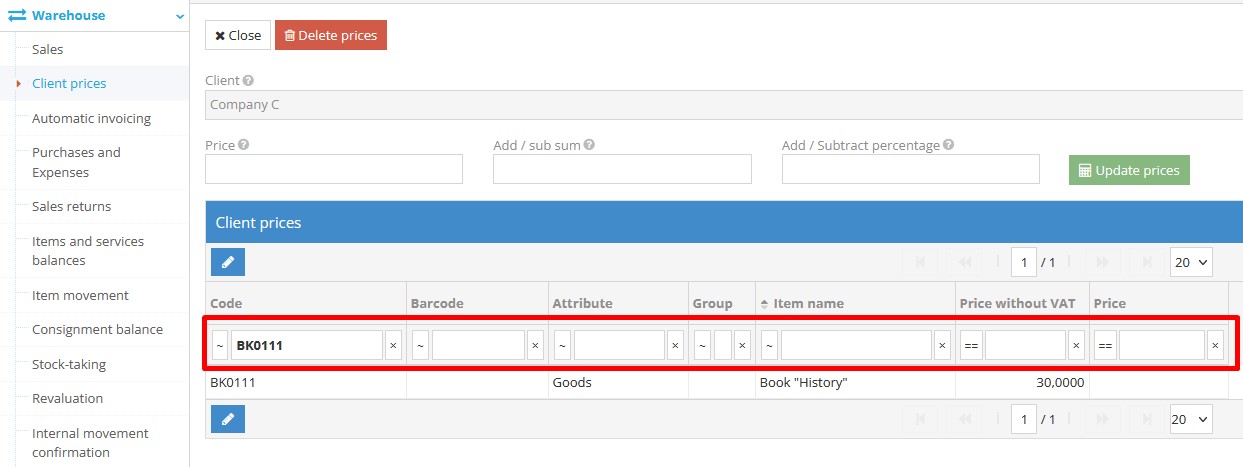
    1. Find the customer

    to whom you want to assign individual sales prices and click the “Pencil” (Edit) button.

    • In the “Customer Prices” table, select a specific product or multiple products using a filter, such as attribute, group, or other criteria from the list.
    • Enter the desired price.

    Note: The entered price will be applied to all selected product rows.

    Selecting products for individual client prices

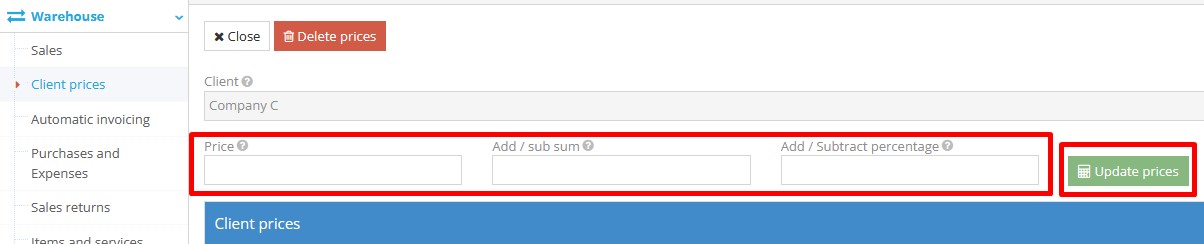
    2. Fill in one of the price adjustment fields:
    Important: Only one of the following fields should be filled — the system will apply only the value that is entered.

    • Price – enter the exact sales price that will be applied to the selected product for the selected customer. During the sale, this price will automatically be used in the sales document when this customer and product are selected.
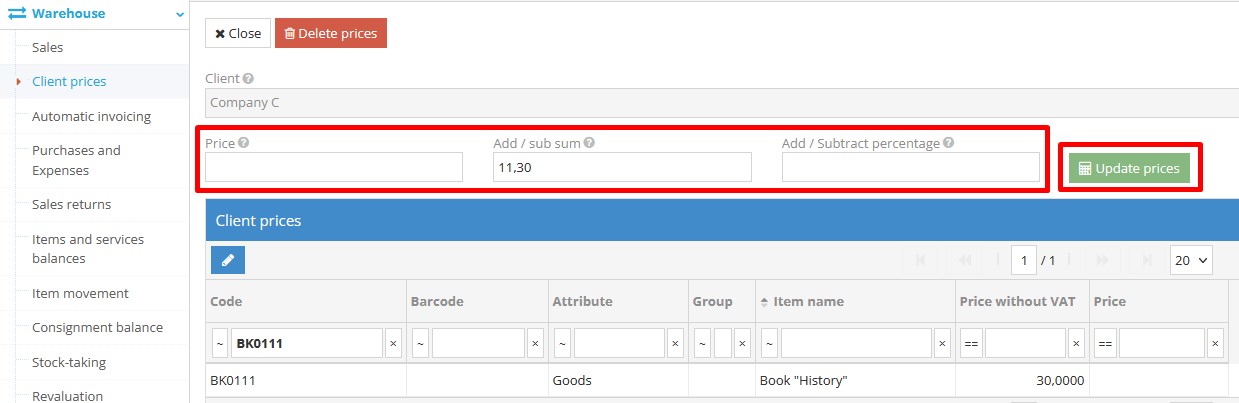
    • Add / Subtract amount – enter a specific amount in euros to be added to or subtracted from the product’s base price excluding VAT (as defined in the product card). Examples:
      – enter 11.30 to increase the price by €11.30;
      – enter -11.30 to decrease the price by €11.30.
    • Add / Subtract percentage – enter a percentage to increase or decrease the product's price excluding VAT. Examples:
      – enter 1.00 to increase the price by 1%;
      – enter -1.00 to decrease the price by 1%.
    Adjusting sales price for client using price fields

    After entering the appropriate value, click “Update prices”.

    Applying updated price for selected client products

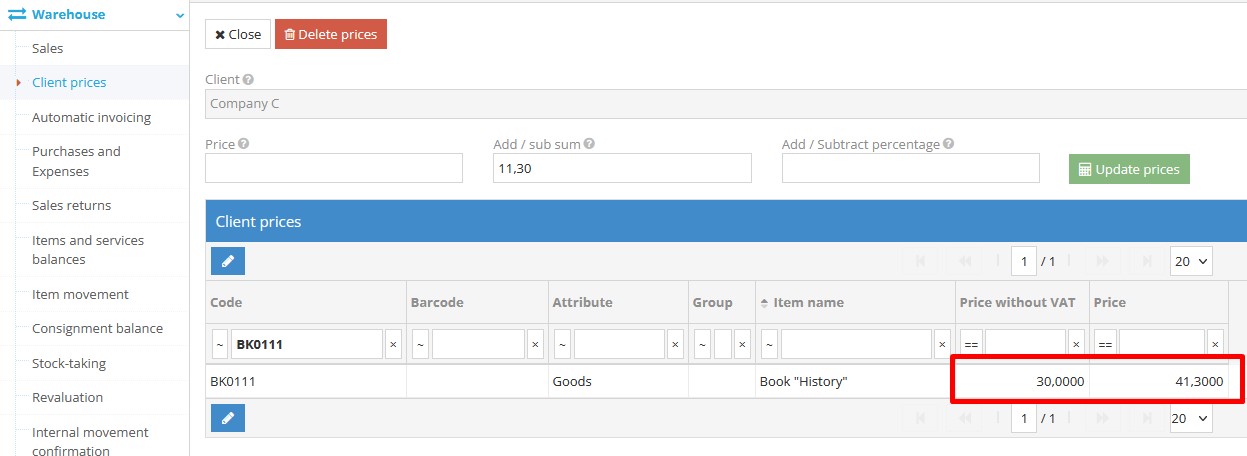
    3. After updating, the “Price” column for each product will display the new amount.
    If you used a percentage adjustment, the system will calculate the new price based on the original base price from the product card — the percentage is applied to the base, not the previously adjusted value.

    New price displayed after adjustment in client price table

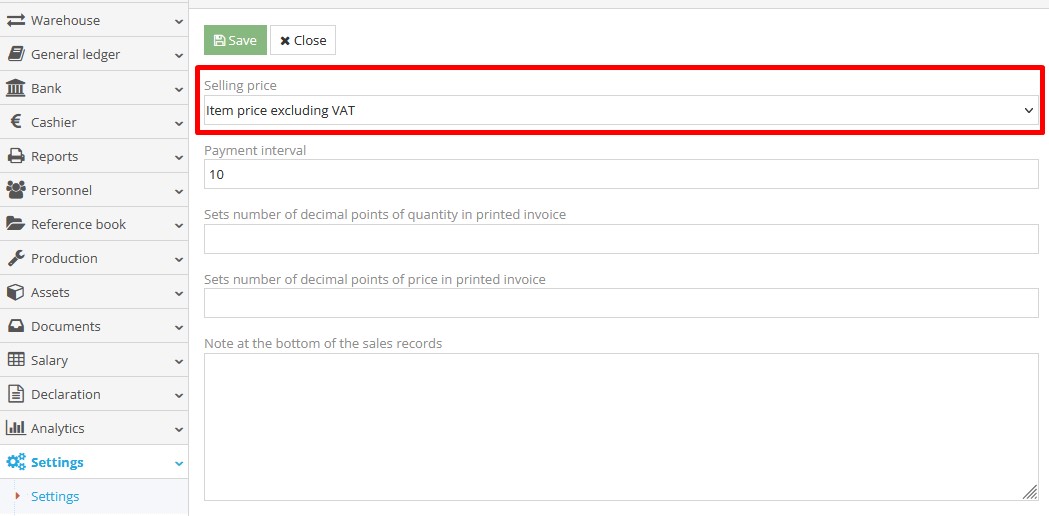
    Note: If the price set for the customer does not appear in the sales document, check the settings: Settings → Settings → Sale
    In the field “Selling price”, the value “Item price excluding VAT” must be selected.

    Correct selling price setting for client prices

    People also found this article using these queries:

    • How to set the price of a particular product for a chosen customer
    • How to allocate a product’s price to a specific customer
    • How to designate a certain product’s price for a selected client
    • How to determine the price of an individual product for a particular customer
    • How to apply a specific product price to a chosen customer
    • How to give a set price for a product to a selected customer
    • How to attribute the price of a given product to a specific customer
    • How to establish a product’s price for a designated customer
    • How to assign a particular item’s price to a chosen client
    • How to link a specific product price to a selected customer
    • How to fix the price of a certain product for a particular customer
    • How to specify the price of a product for a chosen customer
    • How to determine a set price for a product for a specific customer
    • How to attach a product price to a particular customer
    • How to allocate a certain price to a product for a selected client
    • How to configure a product’s price for an individual customer
    • How to appoint a price for a specific product to a chosen customer
    • How to set a designated product price for a particular customer
    • How to register a special price for a product for a specific customer
    • How can I set the price of a particular product for a chosen customer?
    © Site.pro 2011. Website Builder. United States.
    Contact SalesContact SalesTerms of ServiceTerms of ServicePrivacy PolicyPrivacy PolicyCookie SettingsCookie Settings