Site.pro Site.pro
  • AI Website BuilderAI Website Builder
    • AI Website BuilderAI Website Builder
    • Online StoresOnline Stores
    • PricesPrices
    • CollaborationCollaboration
    • Website ImportWebsite Import
    • PluginsPlugins
    • Website BuilderWebsite Builder
    • TemplatesTemplates
    • For Design StudiosFor Design Studios
    • Useful LinksUseful Links
    • Affiliate ProgramAffiliate Program
    • We Build for YouWe Build for You
    • ExamplesExamples
    • LanguagesLanguages
  • DomainsDomains
    • Register Domain NameRegister Domain Name
    • Migrate DomainsMigrate Domains
    • For Domain InvestorsFor Domain Investors
    • Domain ZonesDomain Zones
    • DomainityDomainity
    • FAQ: DomainsFAQ: Domains
    • Popular Domain ZonesPopular Domain Zones
    • .com.com
    • .org.org
    • .net.net
    • .us.us
    • .co.co
  • EmailEmail
    • Free EmailFree Email
    • Email for BusinessEmail for Business
    • PricesPrices
    • Transfer EmailsTransfer Emails
    • Custom Domain EmailCustom Domain Email
    • FAQ: EmailFAQ: Email
    • Popular FAQsPopular FAQs
    • Email SetupEmail Setup
    • Auto ReplyAuto Reply
    • Auto ForwardingAuto Forwarding
    • Spam ProtectionSpam Protection
  • Accounting SoftwareAccounting Software
    • Accounting SoftwareAccounting Software
    • ModulesModules
    • PricesPrices
    • Integrations, APIIntegrations, API
    • Accounting Companies (389)Accounting Companies (389)
    • Software Integrators (52)Software Integrators (52)
    • Affiliate PartnersAffiliate Partners
    • Useful LinksUseful Links
    • Business TypesBusiness Types
    • Use CasesUse Cases
    • Accounting CompaniesAccounting Companies
    • Sole ProprietorSole Proprietor
    • InvoicingInvoicing
    • FarmerFarmer
    • E-commerceE-commerce
  • For ResellersFor Resellers
    • White LabelWhite Label
    • Revenue ShareRevenue Share
    • PricesPrices
    • PanelsPanels
    • How it WorksHow it Works
    • Marketing MaterialsMarketing Materials
    • Mass ImportMass Import
    • Our PartnersOur Partners
    • Reselling ExamplesReselling Examples
    • DocumentationDocumentation
    • Free WebsitesFree Websites
  • LearnLearn
    • Knowledge BaseKnowledge Base
    • BlogBlog
    • Growth HackingGrowth Hacking
    • For HostingsFor Hostings
    • For EducationFor Education
    • Website Сreation TutorialWebsite Сreation Tutorial
    • Teaching Institutions (69)Teaching Institutions (69)
    • Accounting Courses WorldwideAccounting Courses Worldwide
  • AI Website BuilderAI Website Builder
    • AI Website BuilderAI Website BuilderAI creates websites for you
    • Online StoresOnline StoresBuild online stores
    • PricesPricesAdvanced Features
    • CollaborationCollaborationCo-create websites live
    • Website ImportWebsite ImportImport Any Website
    • PluginsPluginsBuilder plugin and functions
    • Website BuilderWebsite BuilderKey Features
    • TemplatesTemplates200+ Awesome Templates
    • For Design StudiosFor Design StudiosBenefits for Design Studios
    • Useful LinksUseful Links
    • Affiliate ProgramAffiliate Program
    • We Build for YouWe Build for You
    • ExamplesExamples
    • LanguagesLanguages
  • DomainsDomains
    • Register Domain NameRegister Domain NameDomain registration, parking, transfer
    • Migrate DomainsMigrate DomainsTransfer. Connect. Renew
    • For Domain InvestorsFor Domain InvestorsDiscount on all domains
    • Domain ZonesDomain ZonesBuy New Domain Name
    • DomainityDomainityDomain usage by country
    • FAQ: DomainsFAQ: DomainsFind Answer
    • Popular Domain ZonesPopular Domain Zones
    • .com.com
    • .org.org
    • .net.net
    • .us.us
    • .co.co
  • EmailEmail
    • Free EmailFree EmailCreate email
    • Email for BusinessEmail for BusinessAdvanced features & protection
    • PricesPricesCheap email hosting
    • Transfer EmailsTransfer EmailsMigrate your mailboxes
    • Custom Domain EmailCustom Domain EmailEmail address with your domain
    • FAQ: EmailFAQ: EmailFind Answer
    • Popular FAQsPopular FAQs
    • Email SetupEmail Setup
    • Auto ReplyAuto Reply
    • Auto ForwardingAuto Forwarding
    • Spam ProtectionSpam Protection
  • Accounting SoftwareAccounting Software
    • Accounting SoftwareAccounting SoftwareCloud based ERP
    • ModulesModulesMain accounting software modules
    • PricesPrices30 days free trial
    • Integrations, APIIntegrations, APIIntegration with external systems
    • Accounting Companies (389)Accounting Companies (389)Choose your partner for accounting
    • Software Integrators (52)Software Integrators (52)Pick your integrations partner
    • Affiliate PartnersAffiliate PartnersPartners and Affiliate program
    • Useful LinksUseful LinksCalculators and Calendars
    • Business TypesBusiness TypesUse Cases
    • Use CasesUse Cases
    • Accounting CompaniesAccounting Companies
    • Sole ProprietorSole Proprietor
    • InvoicingInvoicing
    • FarmerFarmer
    • E-commerceE-commerce
  • For ResellersWhite LabelFor ResellersWhite Label
    • White LabelWhite LabelCustomise Builder
    • Revenue ShareRevenue ShareEarn 50% from each upgrade
    • PricesPricesRevenue Share. White Label
    • PanelsPanelsOne product for all platforms
    • How it WorksHow it WorksCloud or On-Premises
    • Marketing MaterialsMarketing MaterialsVideo. Mockups. Blocks
    • Mass ImportMass Import
    • Our PartnersOur Partners
    • Reselling ExamplesReselling Examples
    • DocumentationDocumentation
    • Free WebsitesFree Websites
  • LearnLearn
    • Knowledge BaseKnowledge BaseFAQ, Tutorial, Video
    • BlogBlogSite.pro Blog
    • Growth HackingGrowth HackingBoost your sales
    • For HostingsFor HostingsTips on marketing
    • For EducationFor EducationTraining. Tutorials
    • Website Сreation TutorialWebsite Сreation Tutorial
    • Teaching Institutions (69)Teaching Institutions (69)
    • Accounting Courses WorldwideAccounting Courses Worldwide
  • RegisterRegister
    Site.pro

    Create Your Account

    Get started — free and easy!

    Register

    By registering, you accept our Terms of Service
  • Log inLog in
    Site.pro

    Welcome back!

    Access your work space

    Log in

    New user? Create account
    Forgot password?
  • $
    $
  • EnglishEnglish
  • AI Website Builder (355)
    • Managing Website (22)
    • Website Builder (309)
      • Website creation (70)
      • Text (15)
      • Pictures (7)
      • Additional (8)
      • Media (15)
      • Social (13)
      • SEO (23)
      • Import (8)
      • Commerce (84)
      • Maps (12)
      • Advanced (19)
      • Forms (7)
      • Errors (23)
      • Custom plugins (5)
    • Web Design Studio (5)
    • Affiliate Program (9)
    • Education (10)
  • Account & Billing (38)
    • Account / Profile (8)
    • Payments (9)
  • Domains (47)
    • Purchasing (20)
    • Domain Investors (1)
    • Connecting (26)
  • Accounting Software (721)
    • Dashboard (company) (15)
    • Clients (11)
    • Warehouse (125)
      • Sales (55)
      • Simplified invoicing (5)
      • Client prices (1)
      • Automatic invoicing (1)
      • Purchases (30)
      • Sales return (5)
      • Item stock (1)
      • Item movement (1)
      • Consignment balance (2)
      • Inventory (1)
      • Revalue (1)
      • Internal movement confirmation (1)
      • E-commerce (17)
      • Cash register sales (4)
    • General ledger (31)
      • General register (16)
      • Doc. settlement (2)
      • Period closure (1)
      • Currency exchange rate range (2)
      • Currency exchange rate adjustment (1)
      • Financial accountability articles (2)
      • Cost centers (2)
      • Chart of accounts (4)
    • Bank (28)
      • Bank (10)
      • Bank link with cor. account (1)
      • Import statements (14)
      • SEPA payments (3)
    • Cashier (5)
      • Cashier (3)
      • Money receiving receipts (1)
      • Reference book (1)
    • Reports (34)
      • Inventory report (8)
      • General ledger reports (9)
      • Ind. activity report (1)
      • Sales-purchases (4)
      • Debt management (4)
      • Balances / PLN (2)
      • Other reports (3)
    • Personnel (24)
      • Employees (19)
      • Requests (1)
      • CV (1)
      • Reference book (3)
        • Job positions (1)
        • Request types (2)
    • Reference book (20)
      • Item cards (5)
      • Warehouse (7)
        • Warehouses (2)
        • Operation types (5)
      • Intrastat (2)
      • Locations (1)
      • Banks (1)
      • Currencies (3)
      • Currency exchange rates (1)
    • Production (5)
      • Technological cards (1)
      • Production from technological cards (2)
      • Bundle / debundle (2)
    • Assets (15)
      • Long-term assets (13)
      • Low value assets (1)
      • General report (1)
    • Documents (39)
      • Orders (19)
        • Orders (12)
        • Order attributes (5)
        • Daily allowance (2)
      • Insurance (2)
      • Agreements (1)
      • Emails registry (2)
      • Outgoing mail register (1)
      • Incoming / Outgoing document register (1)
      • Annual leave (9)
        • Accumulated holiday days (2)
        • Vacation balances (6)
      • Incapacity certificate (2)
      • Internal documents (2)
    • Salary (49)
      • Payroll (26)
      • Timesheets (7)
      • Work schedule (1)
      • Wage prints (13)
      • Reference book (2)
        • Wage codes (Registers) (2)
    • Declaration (34)
      • Generate declarations (18)
      • Declaration signs (1)
      • i.VAZ (3)
      • i.SAF (5)
      • SAF-T (1)
      • GPAIS (6)
    • Settings (150)
      • Settings (30)
        • System and logos (5)
        • Sales (5)
        • Accounting (7)
        • Declarations (1)
        • Data exchange (2)
        • Users / employees (1)
        • Invoices recognition (2)
        • Additional employee attributes (1)
        • Additional item attributes (1)
        • Additional sale attributes (1)
        • Approval of documents (1)
        • Self-employed (1)
        • Sending invoices by email (2)
      • Integrations (107)
        • API (16)
          • API for e-commerce (8)
          • API simplified (5)
        • Artificial Intelligence Assistant (3)
        • Plugins for E-shops (7)
          • WooCommerce (4)
          • PrestaShop (1)
          • Opencart (1)
          • Adobe Commerce (Magento) (1)
        • Trading Platforms (23)
          • Allegro (1)
          • eBay (2)
          • Amazon (3)
          • Shopify (5)
          • Etsy (5)
          • Site.pro (3)
          • Varle.lt (1)
          • Verskis (1)
          • Pigu.lt (1)
        • Cash registers (16)
          • Čekis cash register (1)
          • Paysera POS (1)
          • Raso cash registers (11)
          • Restera (1)
          • nSoft (1)
        • Automatic import of bank statements (6)
        • Creditonline.eu (1)
        • MIP (6)
        • Analytics (2)
      • Data import (13)
    • Account (135)
      • Dashboard (27)
      • Companies and users (30)
      • File upload (6)
      • Employee account (5)
      • My data (22)
      • Affiliate program (4)
      • Invites (3)
      • Reminders (1)
      • Robots (5)
      • Support (7)
        • How to book the program training? (1)
      • Statistics (4)
      • Other information (21)
  • Mailboxes (29)
  • For Resellers (138)
    • Brand (Cloud, On-Premises) (31)
      • Cloud (5)
      • On-Premises (26)
    • License (46)
    • Installation (28)
      • Website Builder (22)
      • Website Builder Plugin (6)
    • Hosting/Billing Panels (33)
      • WHMCS (6)
      • cPanel (6)
      • DirectAdmin (9)
      • ISPmanager (3)
      • Plesk (6)
      • Webuzo (2)
      • Control Web Panel (1)

Table of Contents:

Category
Search
Filter
  • All (1381)
  • AI Website Builder (369)
  • Domains (88)
  • Mailboxes (66)
  • Accounting Software (808)
  • For Resellers (466)
  • Table of Contents:

    How to enter a purchase from individuals based on a purchase-sale agreement?
    Registration of a purchase when buying from an individual under a Purchase-Sale Agreement, where amounts must be declared in the GPM312 declaration.Sequence of actions: Settings → Settings → PurchasesCheck the box "Show GPM rate in purchases?"; checking this box adds an additional field in the Purchase module.Select the clearing account you want to use for GPM accrual (the clearing account is used as an example; for correct data, we recommend using clearing accounts according to your company's approved chart of accounts and accounting policy).Fill in the title for the Purchase-Sale Agreement being generated, so that it can be printed.Settings → Settings → AccountingAssign the created VMI client in the "VMI client" field. After filling in the field, click "Save".Warehouse → PurchasesCreate a new entry for purchase registration How to register a purchase document?After entering the purchase, specify the applicable GPM rate.Click the "Deductions" button and select "Accrue GPM amount".The GPM accrual is automatically registered in the General Register. You can check it by clicking the "Double entry" button to verify that the accrual was performed correctly.Printing the Purchase-Sale AgreementInside the entry, click the "Print" button, select the "Agreement" template from the list, and click the "Print" button: Generating a Cash Disbursement Voucher (CDV)Inside the entry, click the "Other actions" button and select "Create cash disbursement voucher" from the list.In the window that opens, select the cash account from which the disbursement voucher is being generated:A "Cash disbursement voucher" is automatically created, and the cash entry window opens.Inside the entry, highlight the item and click the "Taxes (GPM313, GPM312)" button , fill in the fields in the window that opens for GPM312 declaration accrual, and save the entered information. Click the "Print" button to print the Cash Disbursement Voucher (CDV).The GPM accrual is automatically registered in the General Register. You can check it by clicking the "Double entry" button to verify that the accrual was performed correctly.Bank → Bank (If payment is made via bank transfer)Create a new entry for bank transfer registration.Inside the entry, highlight the item and click the "Taxes (GPM313, GPM312)" button , fill in the fields in the window that opens for GPM312 declaration accrual, and save the entered information.After filling in the table fields, click the "Save" button. Once an "Income class" and "Income code" are assigned to the amount, this amount will be included in the GPM312 declaration. Note. If this field is already filled in, skip this step. Note. The instructions provide example correspondence accounts from the chart of accounts; for correct data, we recommend using correspondence accounts according to your company's approved chart of accounts and accounting policy.
    FAQ
    ›
    Accounting Software
    ›
    Warehouse
    ›
    Purchases
    Accounting Software

    How to enter a purchase from individuals based on a purchase-sale agreement?

    Registration of a purchase when buying from an individual under a Purchase-Sale Agreement, where amounts must be declared in the GPM312 declaration.
    Sequence of actions:

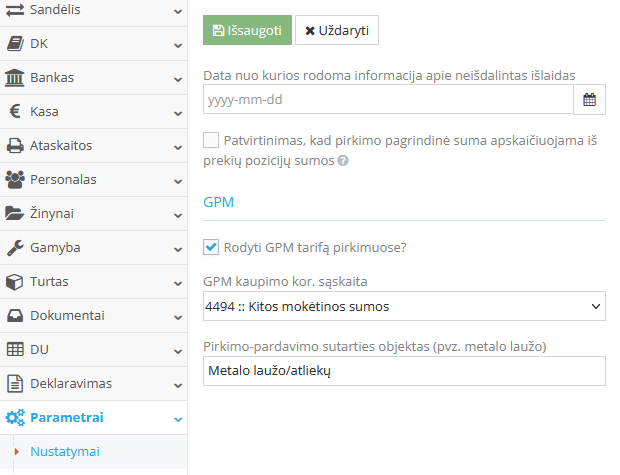
    1. Settings → Settings → Purchases
      • Check the box "Show GPM rate in purchases?"; checking this box adds an additional field in the Purchase module.

        Select the clearing account you want to use for GPM accrual (the clearing account is used as an example; for correct data, we recommend using clearing accounts according to your company's approved chart of accounts and accounting policy).
        Fill in the title for the Purchase-Sale Agreement being generated, so that it can be printed.

        GPM settings window for purchase registration


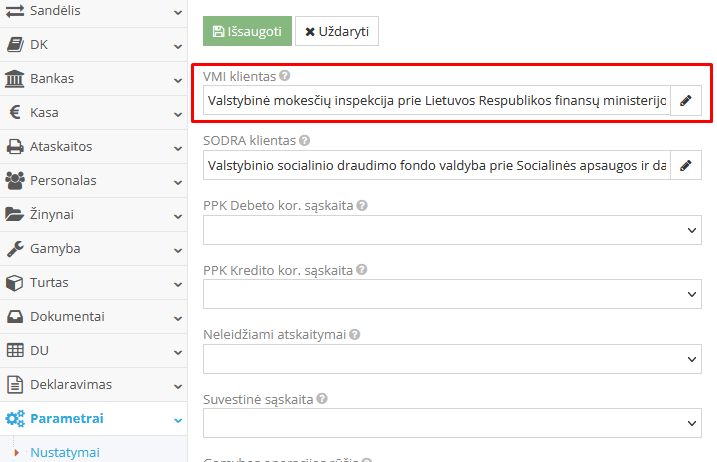
      Settings → Settings → Accounting

      Assign the created VMI client in the "VMI client" field. After filling in the field, click "Save".

      Warehouse → Purchases

      Create a new entry for purchase registration How to register a purchase document?


      • After entering the purchase, specify the applicable GPM rate.

        Click the "Deductions" button and select "Accrue GPM amount".

        GPM calculation window in the purchases module

        The GPM accrual is automatically registered in the General Register. You can check it by clicking the "Double entry" button to verify that the accrual was performed correctly.

        Double entry verification window


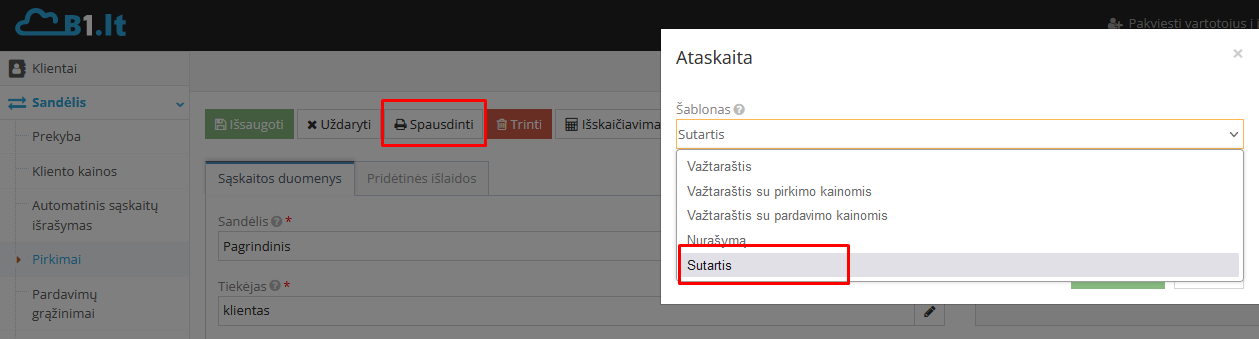
      Printing the Purchase-Sale Agreement

      Inside the entry, click the "Print" button, select the "Agreement" template from the list, and click the "Print" button:

      Purchase-Sale Agreement printing window


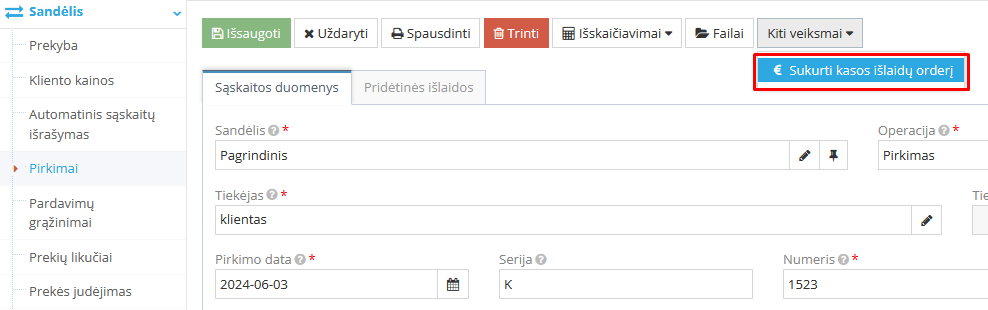
      Generating a Cash Disbursement Voucher (CDV)

      • Inside the entry, click the "Other actions" button and select "Create cash disbursement voucher" from the list.

        Action to create a cash disbursement voucher

        In the window that opens, select the cash account from which the disbursement voucher is being generated:

        Cash account selection window for disbursement voucher

      • A "Cash disbursement voucher" is automatically created, and the cash entry window opens.
      • Inside the entry, highlight the item and click the "Taxes (GPM313, GPM312)" button

        Taxes GPM313 and GPM312 button

        , fill in the fields in the window that opens for GPM312 declaration accrual, and save the entered information.

        GPM tax deduction window in cash register

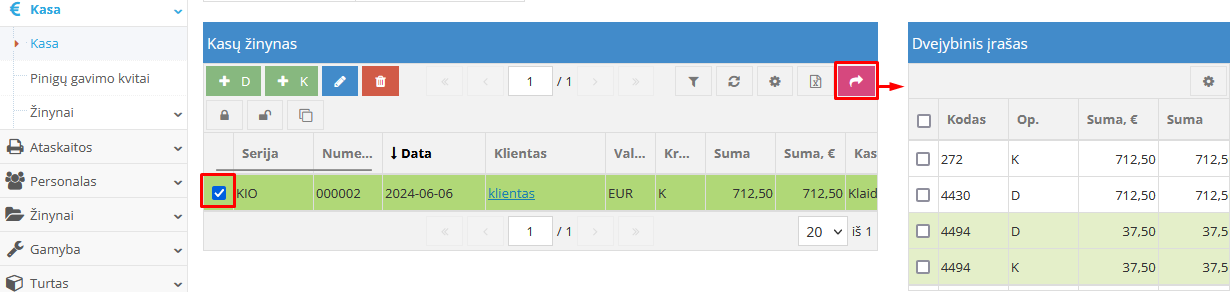
      • Click the "Print" button to print the Cash Disbursement Voucher (CDV).

        The GPM accrual is automatically registered in the General Register. You can check it by clicking the "Double entry" button to verify that the accrual was performed correctly.

        Cash disbursement voucher double entry window

    2. Bank → Bank (If payment is made via bank transfer)
      • Create a new entry for bank transfer registration.
      • Inside the entry, highlight the item and click the "Taxes (GPM313, GPM312)" button

        Taxes GPM313 and GPM312 button for bank transfer

      • , fill in the fields in the window that opens for GPM312 declaration accrual, and save the entered information.
      • After filling in the table fields, click the "Save" button. Once an "Income class" and "Income code" are assigned to the amount, this amount will be included in the GPM312 declaration.

    Note. If this field is already filled in, skip this step.

    VMI client assignment settings in accounting

    Note. The instructions provide example correspondence accounts from the chart of accounts; for correct data, we recommend using correspondence accounts according to your company's approved chart of accounts and accounting policy.

    © Site.pro 2011. Website Builder. United States.
    Contact SalesContact SalesTerms of ServiceTerms of ServicePrivacy PolicyPrivacy PolicyCookie SettingsCookie Settings